



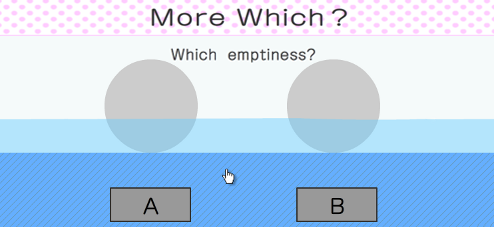
 See these two circles? One isn't empty but one is. Which is it? You've been asked this question before but that doesn't mean you're all out of answers. After all, there are many more ways to contemplate the differences, sometimes obvious, other times subtle, between two seemingly like spheres. That's why there is More Which?, a pleasantly uncomplicated puzzle from Yoshio Ishii of Nekogames. It's just challenging enough, requiring occasional lateral leaps or outside knowledge, to provide a full feeling of satisfaction when you make it through 20 levels with a perfect score. It's nice to be appreciated and it feels to good to be told "Good." And all you need to do is take a brief breather to click and point out which is which.





Walkthrough Guide
(Please allow page to fully load for spoiler tags to be functional.)
More Which? Walkthrough
Eight?
Click and pull each circle. The one that stretches into 8 circles is it.
Skewer?
Lift up each circle. The one with a pole in the middle is it.
Deep?
Click and hold the cursor over each circle. The one in which the cursor sinks deeply is it.
Square?
Click and drag on the edges of each circle. The one whose four corners stay out into a square shape is it.
Mirror?
Hover your cursor over each circle. The one in which the cursor has a "reflection" is it.
Semitransparent?
Which your cursor as an arrow, click and hold between the two circles. Next, drag the arrow under each circle. The one under which you can see the arrow is semitransparent.
Iron?
Click and drag each circle up to the "ceiling." The one that sticks (notice the colors on top and bottom connote a magnet) is iron.
Emptiness?
Click on the blue space below the circles and drag it all the way down until it's all water. The circle that floats up to the surface is empty.
Clockwise?
Click and hold for a few seconds over each circle. The one that spins in a clockwise direction (from left to right) is clockwise.
Eraser?
Pick up each circle and "rub" it against the words at the top of the screen. The one that erases the words is an eraser.
Night?
Click the bottom of each circle and drag upwards to lift its "shades." The one that has a darkened sky with a pale blue moon (as opposed to a bright sunny sky) is night.
This Side?
Pick up each circle and drag it up to the words at the top of the screen. The one that goes over the words (instead of behind them) is on this side.
Clay?
Poke each circle. The one in which a lasting impression is made is clay.
Lacking?
Pull one circle over onto the other, and then vise verse. The one that gets cut out is lacking.
Caught?
Click on each circle to pull it up then click underneath it to hold it up. The one that wiggles like a caught fish is "caught." (This might take a little experimentation until you see it happen).
Long?
Click and pull each circle to the opposite side of the screen. The one that stretches out with a thinner line is long.
Slippery?
Click in the middle of each circle and drag upwards. The one on which your cursor swerves or slips around is slippery.
Fresh Mochi?
Mochi, the rice dough covered Japenese treat, is freshest when it's soft and pliant. So click on each circle and pull out. The one that pulls easiest and farthest is the fresh mochi.
Full?
Click the very top of each circle and pull up to look under its "lid." The one filled to the top with water is full.
Do not press?
This one you must answer quickly. When you click a circle, if the whole screen starts to shake, then quickly select it's corresponding "A" or "B" button before the screen blows up.
Posted by: elle |
March 20, 2013 7:43 PM
|
March 20, 2013 7:43 PM