



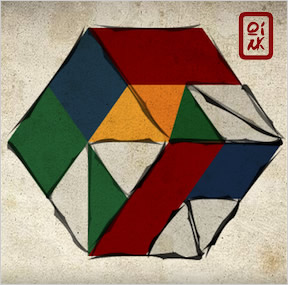
 Qink, an innovative puzzle game from South African software developer Collective Mass, is the unholy union of a Rubik's Cube and a Tangram. Okay, you might not think there's anything wrong with mixing those two ingredients. They are both puzzles, after all. But consider that one is a three-dimensional puzzle and one is a two-dimensional puzzle. Now, I may be old-fashioned, but I believe that mating two entities that follow entirely different physical laws is wrong. I'm not saying that this game is necessarily a crime against morals and decency. I'm just saying that this is how portals to the underworld are accidentally summoned. Just be careful, all right, Collective Mass? Just watch it.
There are two modes of play in Qink. One will drive you slowly insane, and the other will do it quickly. I recommend you start with Patience Mode, which gives you a limited number of pieces and all the time in the world, but perhaps the time limits and creativity of Fury Mode will suit your temperament better. In both modes, your goal is to completely fill the sides of your onscreen cube with a selection of shapes at the bottom of the screen. Rotate your cube with the [arrow keys] or [WASD]. Select an area of the cube by clicking and dragging over it, then click on the appropriate shape from the menu below to snap it into place.
The catch is that you can't rotate the shapes themselves, only the cube. So if you want to fill a triangular area, and the only triangle at your disposal is facing the wrong way, you must first rotate the cube around until the empty space is orientated correctly. The size of the space doesn't matter. You can fill a large diamond-shaped area and a small diamond-shaped area with the same little diamond. The only requirement is that the piece and the space have the same shape and orientation.
Simple enough, but the real catch is that you can rotate the cube part-way, so that you're looking at two, or even three, sides simultaneously. And while you are viewing this hybrid flattened perspective, you can still plaster shapes onto the cube as though you were working with a flat surface. It's a very strange mechanic, and it takes some practice before the old jaded brain can wrap itself around the problem.
In Patience Mode, you must use a fixed selection of shapes to fill up the cube exactly. Each side must be a single color, and every puzzle piece must be used. It's relatively easy when you're dealing with mere rectangles, but when Qink hands you a palette of hexagons and chevrons, be prepared for the little silent screams inside your head. After each level, the game rewards you with a hearty thumbs-up from your little Qigong Master and a level password. If you do manage to collect a few of these passwords, I recommend you hold onto them. You can probably trade them for some pretty good favors.
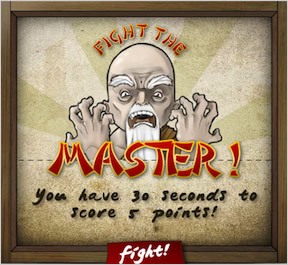 Fury Mode plays more like an arcade game. Shapes will continually appear on your menu, and you have to place them quickly to keep from running out of time. You can get rid of inconvenient pieces by filling a square with any combination of junk, but you only get closer to completing a level when you fill a side with a single color. There's even a sort of Boss Mode at the end of each level, where you must score a certain number of points within a strict time limit or lose the game.
Analysis: There's no way around it. The learning curve in Qink is like a brick wall. But the smooth presentation and considerate menu of options go a long way toward easing the transition. The music and the artwork, which echo traditional Chinese craft, do their best to fool you into thinking that you are doing something calming. And you've always got the approval of your Qink Sensei to shoot for.
If you can get through the uncomfortable learning period, the twisted logic of this forced-perspective world makes sense, and even begins to feel natural. The jerky, not-quite-3D rotation of the cube remains awkward no matter what—you can only view the cube from certain angles if you approach it in just the right way—but that was probably necessary in order to keep the controls manageable. Many 3D puzzle games, such as Tetrical, require at least six buttons to manipulate objects along three different axes, and it's really too much to ask of a human being.
I'm always going to give major points to a well-designed concept that offers something genuinely different, even if it has some quirks here and there. Part of gaming—and life—is to rack up unique experiences, and your only opportunity to paint three sides of a cube with a hexagon while a balding monk shrieks at you may be to



It is interesting how you can place the pieces at angles. That adds a whole new level to the game.
A nice one.
The fury mode was too hard for me - couldn't get thru level 2 in 3 tries and you don't have to know a game to know getting stuck on level 2 is a miserable performance :) There's nothing wrong with furs, it's just to fast for me.
Patience was much more like my kind of game.
A good one, high score from me.
I don't know if this is intentional, but with the Chinese theme... in pinyin (the official romanization system for Mandarin Chinese), the letter q is pronounced "ch". (Why didn't they just use "ch"? Well Mandarin has a frontal ch and a back ch. The back ch uses "ch".)
"Qin" sounds exactly like the English word "chin".
So would that make "Qink" "Chink"?
I'm willing to give them the benefit of the doubt, but it's sort of strange that the name they picked, when pronounced according to Chinese pinyin alphabet, sounds like a racial slur for Chinese people.
The game is very pretty. I'm not very good at spacial puzzles though, I think connected to my inability to use maps and give directions. ^_^
Oh and by the way, to Jay: I just got your email about the double posting thing, and I am meticulously screen-shotting in case it happens again.
Whoa, this game is incredibly fresh and clever.
Possibility!
I use a Firefox script called Greasemonkey. Let me try turning that off and see if it solves the double-posting problem.
I'm willing to bet that there isn't a solution for level 3. There is just no possible way of placing the yellow less than tile on only one face of the cube, and since it's the only yellow piece you get on that level, you can't finish the cube.
@ThemePark
At first I thought it was impossible too, had no idea how to do it. If you really get desperate though...
Remember how every piece can scale to fit into any size space? The yellow piece fits over the whole of two sides; flip the cube to a diamond, then once to the right, and you can fit it on the two sides that just appeared.
One thing that confused me at first is the apparent sizes of the pieces. The sizes are actually irrelevant, it's only the shape that counts. So the "smaller" diagonal square and the "larger" straight square can both cover the same area. And that can be either a full face or a quarter face.
This game makes no sense.
Or I suck at it....
I think I know which is the case.
You're a genius, poracious. Thank you. :-D
I'm stuck on level 8 currently though. Can't figure out how to place the 2 parallelograms.
I like the concept but the keyboard-controlled rotation starts getting on my nerves very quickly. I guess it's all part of the game, but I don't like when I KNOW the solution but spend ages to fit the cube in the right position.
Mouse-controlled dragging rotation would be much more satisfying in my opinion.
@baba: I totally agree. I often knew where I wanted the piece to go, but took ages rotating to get the cube in the right orientation. Mouse control would have been great.
Me again.
I've reached level 15. I must say I'm enjoying the puzzle aspect immensely, but even though I've mastered the rotating a bit I still think the control scheme sucks. A hundred times I wished I could just reach into the screen with my hand, pull out the damn cube, rotate it into position I wanted and put it back so I can proceed with "painting".
Also, did you notice that the controls aren't reversible? By that I mean that often if you push UP and then DOWN the cube will not return in the same starting position - quite frustrating when you have finally found a perfect position and then overpressed a key by accident. (of course, the REALLY REALLY frustrating thing is when you press that oversized reset button conveniently placed below the first symbol, but that's another story).
3D puzzles work best, well, in 3D. I am definitely coming back to this one as soon as holographic displays become all the rage.
Oh, and
Last level code is: WD46AS7 . And the ending is a "You are the master!" picture with an unworkable "Back to title" button. Kinda disappointing. :(
baba, since you completed the game, could you perhaps help me out with where to place the equilateral triangle in level 9? I can't find a single place where it can fit.
My wants: Mouse controlled rotation and saving progress in patience mode.
Otherwise, great game.
yah! South Africa in da house!
This game is a lot of fun, and absolutely beautiful. It also makes my brain hurt.
@Themepark:
Equilateral triangles can only be placed one way: in the middle of the "hexagon" view, each of their sides being the diagonal of different side of the cube. Usually I sorted them out first and then proceeded with the level.
For instance, if you look at the game's screenshot up there, and annotate each point of the hexagon ABCDEF, you will see that ACE is the triangle you are looking for.
Thempark, how did you fit the two parallelograms in 8? I can't figure them out.
Nevermind.
Hint for parallelograms:
parallelogram + parallelogram = chevron
Gah! I can't believe I'm still stuck on level 3. It's one of those "so obvious I'm missing it" things, probably.
I got the chevron part, but now I'm stuck with 4 empty sides and three colors. It seems to me like the blue AND the green need two sides, which means I'm short one side???
@LSN: perfect timing, I just got stuck on the parallelograms.
OK, I figured it out. It was super-obvious, and like always, I saw it right after I asked for help. Whatev.
If anyone can give me a hint on level 8, I'd be grateful.
I can't find anyplace to fit a chevron besides using two sides of the cube, but if I do that for each chevron then I run out of sides for the rest of the shapes.
Neddo -
The chevrons can cover half of two faces, as well as two whole faces. Try orienting the cube so that you can only see two faces at a time, instead of three.
Wait, nevermind - that didn't seem to work, but I'm on the right track.
I thought the difficulty in rotating the cube was the whole point. Figuring out which pieces to put where is the easy part of the puzzle (usually) and then figuring out how to do that is the hard part. Or at the very least they are just two different phases of solving the puzzle. Of course, if there were buttons to rotate the cube along an axis perpendicular to the screen, it would easier, but that's part of the challenge of the game.
A six-key control scheme may be more complicated, but once you memorize which pair of keys is which axis it's a lot more intuitive than this setup. I don't think you can really consider the unintuitive rotation as part of the puzzle, either. Since it remains constant throughout the levels, all you need to do is figure it out once at the beginning and repeatedly use the same unnecessarily complex rotation algorithm to get what you want. Now, if it changed every so often...But that would be evil.
Amazing puzzler; I love the smooth play and the graphics are well done - not too garish. One slight point though; using red and green is all well and good, but an absolute git if you're colour blind.
I have to say I disagree with the others re: rotation method. I think making it so that placement is possible with one hand while you orient the cube with the other is just fine.
Maybe it's not an equilateral triangle. It looks like it to me, but I could be wrong.
http://img508.imageshack.us/img508/8659/qinkup6.png
@baba, I have encircled the piece I'm talking about and where I should put it, if I understood you correctly. But I still can't fit it anywhere.
And I'm happy, you all figured out how to fit the parallelograms. :-)
Sorry for the double post, but I have to put forward my $.02 about the rotation.
Personally I also think it could've been done better, in a more consequent way, so that moving Up then Down would cancel each other out.
But I disagree about the cube being 3D. It being 2D is a huge part of the puzzle, in form of the tangram figures and the fact that you can't see the 3-dimensional edges this way. Making it 3D would make it way too easy.
ThemePark:
Think bigger. The equilateral triangle fills in a huge area. In the picture you linked, look at the triangle formed when you connect the top-right corner, the bottom-right corner, and the left-center corner of the cube. That's the size of the triangle you need; now just rotate the cube until you get the right orientation.
Hey, neddo, have you figured out #8 yet? Cause I just did.
I was right - the sideways green chevron fits a smaller space. Much smaller, although it can be seen using the exact same orientation as the larger chevron
Hope that helps!
Ahhh. Thanks, muddgirl. I've been staring at this thing forever and yet I never saw that.
Mudgirl - I tried that already, but I still don't see how the triangles fit on level 8.
I can't seem to get a green triangle to span more then one side, and I think I need to since I have 8 small triangles to fill with 5 triangle pieses.
Well, now I just feel downright stupid. How could I not have seen that, when level 5 consisted of nothing but equilateral triangles, and I breezed right through it. Thanks Neddo.
I'm stopping at level 10. This is addictive and IT HURTS MY BRAIN.
This is almost as bad for me as 3D Tetris. @___@
Trenin - for number 8:
You recognize that the triangles pieces can cover 1 or 2 triangles, and the parallelograms must each cover two. But can the triange pieces cover MORE than two?
Notes to designer (if he/she) ever reads this for improving this mostly great puzzler:
1. The commands should be reversible. There's no reason for the axes to randomly shift by 45 degrees all of a sudden. This does not make puzzles harder, it just makes the interface more frustrating.
2. Colour-blind mode. (Especially since in Fury mode you can see the patterns are already implemented).
3. Undo button. Which "undoes" reset button too. Nuff said.
4. How about mouse-only interface? Dragging the cube would feel much more natural (and drag/paint could be toggled with space or something).
5. Non-working "Quit to title" button is not much of a reward for beating the game. :)
These simple things would SO improve this lovely game...
This is a very clever concept. I'll wait till I have a mouse to get into the fury mode, but I got up to level 14 in patience mode with no problems. I love the hand-drawn box style... reminds me of crayon physics, almost.
The rotation works fine for me. Maybe if it was a little smoother it'd be nicer, but it's fast enough that I can get where I want even if it's not the most direct route...
hey can someone please help me with number one? i feel so dumb cuz i cant figure it out and everyone has just breezed right by. cant figure out where to put the diamond-ish pieces. just those last two and im done.
thanks!
Level codes:
Level 1:
Q13SD5G
Level 2:
KSP392M
Level 3:
VVND20S
Level 4:
P68D09M
Level 5:
66NM99S
Level 6:
PPS101V
Level 7:
FGL2A3C
Level 8:
PLA9L3O
Level 9:
34SD98L
Level 10:
D56A8Q9
Level 11:
Q96873P
Level 12:
ZAS390H
Level 13:
JJL6598
Level 14:
19HG29X
Level 15:
CML96Q4
Level 16:
3U6X9V1
Level 17:
WD46AS7
Anonymous, about the diamonds:
Keep rotating the cube. Do you see anything diamond shaped?
Have you tried every possible orientation of the cube? Like where it's sitting on one of its corners?
Like, say, a diamond?
*sigh*
I'm stuck on level 3 like some other people. I've got the chevron piece correctly placed, but am completely lost on where the other pieces go.
So I'm basically in the same situation as muddgirl except this "super-obvious" solution isn't so super-obvious to me. It's very annoying when I ask for help and am just told "Oh, it's so obvious. I'm not going to help you at all." Thanks for making me feel extra stupid.
Wow... I'm in a bad mood. *shrug* I guess I just hate when someone could help me but decides not to.
Completed.
The game's not so difficult if you think about it logically.
All triangles, no matter what size, shape, or angle, will fit into the same triangular shape. You just have to turn the cube to make it fit.
For other shapes, look at the lines on the cube as you turn it through various angles until you see their outlines. Sometimes they may need to take up whole sides, or more than one side.
Level 3 For Nemo07:
so you've filled 2 sides of the cube with the chevron, right? Now you have 2 blue squares left, which can't made a square together, so they each have a full side. There are 2 colours left and 2 empty sides, fill them in with 4 triangles each.
Hopefully that helps you get the hang of it?
yeah ive tried every possible orientation i can think of. the pieces arent like a normal diamond/rhombus shape, theyre kinda fat and i cant get em to fit ANYWHERE
maybe ill just steal the level code so i can move on to level2
ok wow nevermind, im an idiot. i tried every possible obscure combination i could think of and it was just so obvious. thanks for your help.
Nemo07, here's a hint for you.
You can't do a single square with two squares, so, since any face must be single-colored, what can you do with only two squares of one color?
An hint for everyone:
You have to figure out what some pieces can and can't do. Especially what they can't, in fact. Some pieces can be used in very few ways (chevrons, hexagones), even only one way (the equilateral triangles), so they are usually the first you should place.
Amusing game. I went through the whole Patience mode. I found the difficulty curve a bit random: the last puzzle seems easier to me than some of the previous ones. I'd sooo want more level!
I suck at the Fury mode, though.
That was an incredibly strange game. I'm on level 8 and I still only barely understand the rotation mechanics.
I've only played through two levels on patience so far, but I think this game is brilliant! What a magnificent concept, and the execution is great!
I'm also stuck on level three. The green triangles won't go into four pieces for me.
Level 5 hates me.
I love this game. I live for this type of puzzle. The fact that you have to rotate like you do adds to the challenge. I wish there were an undo button, though. Once I've got something figured out, I hate having to redo it if I mess up later on. Plus, it makes me more likely to memorize the moves, reducing future replay value.
And a mute button. I'd like to listen to my own music but I have to mute everything when I get annoyed by in-game music.
In addition to Baba's comments above, I'd add:
1) The ability to move the pieces around in the "hold area", or at least to scramble them.
2) The ability to "scroll" to see all the pieces in the "hold area". Or did I miss this command?
But still, quite fun.
Anon
Dana, you can turn off the music: click the "Qink" logo in the top-right corner to bring up a menu, then choose Options and turn music all the way down.
Game make brain hurt.
I would rate level 13 was the hardest.
Hah! I finally got it! :)
The green pieces were what stumped me.
You have to make the pieces "tops" all point to the center. It'll take a bit of moving around, but it works. :)
It would be really, really helpful if all of the pieces you could place when you have an area selected would light up or something. When you encounter a new, odd shape, figuring out where exactly it can fit sometimes takes a lot of "select area that looks about right and click the shape hoping it fits there".
Man, after banging my head on 9 a while, 10 felt like a walk in th park.
One look at 11, I could tell ti is goign to have a bunch of correct setups, but I will still jack it up. Giving my eyes a break before I take it on.
This is a great game!
I actually like the keyboard-controlled rotation -- I feel like it's much crisper that using the mouse, and actually saves time once you get the hang of it. My problem is not getting the empty spaces to show up, it's getting them to show up in the correct orientation, which I suspect is a large part of the challenge that the designer had in mind. If it wasn't, then they would simply have made the pieces rotatable.
I've never been in the high scores on a game before. Ever :-)
I agree with matador, 13 is the hardest, well, so far. I can't seem to beat it, any suggestions?
Matador (or anyone else) you couldn't give us a hint for l13, could you?
I made the green face first, then put the two equilateral triangles in. Then I get stuck. I always have extra pieces or spaces for the remaining bits!!! :/
It's too short, needs more levels CX Patience mode, at least.
Level 13:
By now you should have figured out that the equilateral triangles can only be placed one way, so do those first. That leaves only one face left on which to place the green pieces.
Now, you will notice we have a very limited number of triangles. All of those can cover a wide variety of spaces, so we will leave those alone for the time being.
There are only three ways in which we can use the diamonds: to cover an entire face (which does not apply in this level), to cover a 1/4 square of a face, of to wrap around one of the edges, covering 1/4 of both with a triangle.
If we used the diamonds to cover 1/4 of a single face, we'd require more triangles than we'd have. So they must wrap around the two edges we have blank.
Now we have four triangles left, and four triangular blanks!
I am totally stuck on Level 14.
I get where the blue piece goes, but I can't make the yellow pieces fit in the remaining space. I've either got too many or there's a whole side left over. Help?
Nevermind, I just figured it out!
Thank you lizard. I can't believe I didn't even think of
trying to put diamonds on two sides
Joye-
Very good point about the name. Of course, "chink" also means a narrow opening. Maybe South African English has that meaning but not the racist one. ('course, now that I think about it, the two are probably etymologically related.)
-J
Awesome game. This is how you make a game that's difficult and fun without being frustrating. I'd definitely like to see more puzzles for the patience mode, as I just can't get enough with 18.
well im probably missing something, but i firmly believe lvl 7 is impossible. spoilers juuuust in case
so the hexagon would take up 3 faces automatically (if theres another way to put it, that must be why im failing). then its impossible to fit a whole face with only 2 yellow diamonds. and if you fill 2 faces of yellow, theres too much leftover red! AHHHHH!
OOOOHHH
nevermind.
there ARE 2 ways to place the hexagons
Hm. Would someone please give me a hint o the three blues in level 15?
Augh, power of the post- nevermind. :)
A good little game. Yeah, the controls are a little interesting, but a pretty good compromise considering the four intuitive directions on a keyboard. The problem with rotations not being reversible is a matter of some reasonably logical design decisions in light of the four-direction limitation. Though I found that the left and right controls were perhaps backwards? I never had problems with up/down, but I kept choosing the wrong left/right key. Looking carefully at this, I see that the up/down operation works so that more of the cube is exposed in the direction you pushed (more of the top is shown when you push 'up'). But with left/right, the cube is rotated in the direction of the arrow key (making more of the left show when you push 'right'). I do believe that the controls would clunk rather less if this interface problem were fixed, and I think this particular bit is an interface problem, not a 'game challenge' (unless you like those wacky games where you pick up the wrong bonus and it makes your mouse work mirror-wise for a while). So I don't think it even needs mouse control of the rotation, and I agree that the addition of such a feature would overload the mouse badly.
I can't seem to get 14 down!! any clues? i always end up with one small triangle or an entire side empty. help please!
help with level 10? How can i make 3 right triangles (all yellow, let's say) completely cover a side, or more than one side, without leaving parts of the side blank?
@April:
One of those three triangles is half of the square, and the other two are quarters. That fills one square exactly.
Hope this helps!
Sorry, I am not awake, I meant @Ev on that last post :). This is the problem with several of the months being deemed reasonable names for girls.
Here's a post in hopes that it will reset my mind so I can solve level 14.
What I think I have right:
The hexagon has to cover 3 sides, so the other shapes must cover the remaining 3 sides somehow.
That's about it.
Actually, no.
Hexagon doesn't HAVE to be placed on three whole sides, it can also be placed on one little "cube" which is like, 1/8th of the entire cube.
I am not telling you how to solve level 14, though, just dropping ideas. :)
This game quite puzzling. Although I would've gone better if there had been a mouse control option.
I'm the master!
I know that, babaa, but level 14 just has one hexagon, and placing it in the little area it fits rather than the big, 3-side area it fits would mean having 3 sides that are not all a single color.
Please...please please add Rotate clockwise and counter-clockwise buttons!
FINALLY beat it! I was stuck on Level 11 for the longest time, after that the rest were a breeze.
I'd love to see this game have a "random" button added, for generating puzzles... barring that, add more! I much preferred Patience Mode.
Passed 14!
I don't want to try level 17...it scares me...
Tips for basic cube rotation:
U=up, D=down, R=right, L=left
Looking straight on at a face, to rotate it by 45 degrees counterclockwise, press RRULL. This has the effect of turning a square view into a diamond view and vice versa. If you want to rotate by 90 degrees, put another U in the middle (RRUULL). Clockwise rotation is LLURR.
When viewing the top and 2 other sides of the cube, you can rotate the top clockwise 45 degrees with DRRU.
Pressing the same direction 4 times will always move you to the other side of the cube. If you started in the 3-side view, however, you might end up in a different 3-side view (because there's 4 kinds of those views, but they're hard to describe well) depending on which 3-side view you started from.
Tips for shape placement:
Any 4-sided piece except the 2x1 rectangle can fit any whole side or 1/4 side of the cube. The rectangle only fits 1/2 side.
All triangles except the equilateral triangle can be used to fill 1/8, 1/4, or 1/2 of a side.
If you can fit the chevron somewhere on the cube in a certain view, then you can also put it down 2 other ways in that same view.
if you can fit the hexagon somewhere on the cub in a certain view, then you can put it down 1 other way in that same view.
The equilateral triangle can only be placed when viewing 3 sides of the cube at the same time.
LSN, I tried to read your instructions but my head exploded about half-way... :)
Very nice game, but I have a complaint about the geometry, specifically the parallelograms. The two different ways they can be used imply different shapes.
When using them as
squares to cover one side or one quarter of a side
they are essentially two equilateral triangles pasted together, with angles 60 and 120 degrees.
When they're used to
wrap around a corner
however, they would need to have a different geometry, with angles of about 35 and 55 degrees.
Everything else, as far as I can tell, is true to it's geometry.
Overall a lovely game, with just this little bit of grit in its gears.
Is anyone else having a problem with the colors? Please help. I only get gray. What am I doing wrong? And then when I rotate the cube the gray disappears. Is this a problem with the game or with my computer? Thanks. Sooze
"Reverse horizontal controls" needs to be an option. The speed mode is almost unplayable. If I want to see the top, I press up, but if I want to see the left side, I press right? bah. Or the mouse control thing
@Sooze
you use the gray to select the area you want, then click the shape below to place it if it fits
i cant beat level 14. none of the previous comments help. AHHHHH
Level 2 of Patience mode appears to be impossible. I've placed all four whole-side pieces, and have nothing left that can fill an entire side with the same color. And the game doesn't let me set a whole-side piece straddling an edge.
I wonder if anyone can give me a hint for level 8?
I've worked out that you can minimise the chevrons and the parallelograms, but I'm always left, seemingly, with one triangle too few to complete the level
Any ideas?
level 15 : the triangles can cover 1/2 or 1/4 of a face
1/2 + 1/4 + 1/4 = 1
hope it's help
Hi everybody:
I have problems with level 3 because I don't how to put the yellow piece. Could someone help me please?? I'm moving the cube but i can't see it. Thank you very much!!
I like the idea of this game but feel incredibly stupid as I'm stuck on Level 2 in Patience mode. It will not let me place my rectangle piece in a rectangle area unless it's on one side only. I cannot place it over two sides, even though the rules state that I can place any piece where it fits.
Remember, the size of a shape may not be important, but the relative dimensions are another story.
Okay, I could really use some help on level 15.
Got it, whew, and now I'm finished. Which is good because I don't think anyone's following this thread anymore. Great game though, once I had played for a while and figured out the rotating controls, that became an accomplishment itself, so I even found that to be a part of the puzzle. I'd find myself clicking 4 times real fast and it being at the right angle and being impressed I had.
SO, for level 9
I can't seem to make the tall diamonds fit anywhere, though I was able to use the wide diamonds
Update