


New games|All games|Competitions|Suggest a game|Favorites|Help Squad|Chat|Prefs

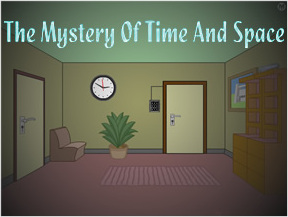
Mystery of Time and SpaceJohnBThe excellent point-and-click game Mystery of Time and Space has been updated with new levels! Billed as an interactive graphic adventure, MOTAS is one of the best and most expansive room escape games on the web. It was also one of the earliest, dating back to the primitive internet era of 2002, just as humans were emerging from the forest and learning to walk on two legs, comb their hair, and hire lawyers.

Every so often the game's author, Jan Albartus, tacks on a few new levels to expand the experience. Each is crafted with unique puzzles and tough challenges to overcome, and an in-game save feature lets you take a break and pick up where you left off. There's even an online level editor to make your own rooms. Start playing and get entranced by one of the classics! Click.

Thanks to Redab37 for sending this one in!

Since we reviewed this one a couple of years ago, you may find a treasure trove of hints, tips and perhaps even a walkthrough or two for the first 14 levels there, so don't give up! =)

  • Currently 4.7/5
  • 1
  • 2
  • 3
  • 4
  • 5
Rating: 4.7/5 (15 votes cast)

New Mystery of Time and Space (MOTAS) rooms! walkthrough now available!

Walkthrough Guide

Here's a complete walkthrough (levels 1-19)...

image
Level 1 Walkthrough
image
  • get key from under pillow
  • open locker and get screwdriver out of box
  • put wall poster under door
  • use screwdriver to take elepant pic off wall
  • then you'll get a thin screw use thin screw in door lock
  • pull out poster from under the door and get key


Level 2 Walkthrough
image
  • Get the diskette box from the top of the cabinet and go to the next room and take the lower right hand corner pin from the flag.
  • Use pin on diskette box to get the floppy out.
  • Insert the floppy disk into the disk drive on the right hand side of computer and turn computer on.
  • Now you have the 1 2 8 6 4 code...enter it into the panel by the door.


Level 3 Walkthrough
image
  • Go through the door to the floor room and switch off the light.
  • Get the 3 wall tiles and switch the light back on.
  • Move the floor tiles at a 90 degree angle to each other and create a pattern that will link top right hole to left one so that the head can move all the way across the room.
  • At the rathole next to the stairs, put the diskette box over the rat hole. Wait for the head to be under the trap to click on it and capture the head.
  • Click on right hand side of stairs to raise them. Put the three wall tiles into the slots under the stairs.
  • Pull out the wall tiles in this order from left to right pull out first tile 2 times second tile once third tile twice and then put the box with the head in it on the tiles...it should move across them if you've pulled them out right.
  • Move the chair to the left side of the stairs..click on stairs to lower stairs.


Level 4 Walkthrough
image
  • Get piece of wood out of fireplace Put piece of wood under laser burn it put it back in fireplace
  • Put triangle under laser ...break it (turn off lamp if need be for more power) put it back in panel by door
  • When putting pieces back in panel by door, put small triangle on bottom large one towards the left and fit the other pieces in after that.


Level 5 Walkthrough
image
  • smilie face pad...press the buttons in this order (if the code says 6 then count across from left to right to the sixth button and press that button and so on) 6, 7, 11, 4, 6, 7, 8, 9, 10, 12, 11, 6, 10, 1, 7, 6, 6, 9, 7, 4, 5, 11, 12, 1, 11, 6 last button is 1101
  • after you've finished the smiley panel, then go into next room, move cabinet and box, and get key from small panel on wall


Level 6 Walkthrough
image
  • Lift doormat and let key drop down through the grate
  • Fix flashlight by using batteries from radio and headlight from motorcycle (use screwdriver to get headlight)
  • Open tiles under rug in this order click upper left one then lower right one then lower left one
  • Click on hose once then click on opening once go down and find key on the floor between 2 cabinets


Level 7 Walkthrough
image
  • Get blue wheel out of picture frame in room that has the note on the table...put it on the leftmost pipe
  • Go up elevator and get green wheel out of cabinet drawer....put it on rightmost pipe
  • Find a pen and a piece of paper...the pen is in a desk drawer...(look for a room with a mailbox...there is a ladder in that room go up that ladder to the room with the desk)...the piece of paper is on a table in a room with a towel draped over a pipe
  • Put the pen and piece of paper on the clone note that was on the table should give you a letter to mail after mailing the letter then look in the bottom of the mailbox for the red wheel put it on middle pipe
  • Find floppy the floppy is in a locker the locker is in a room with a big box that says "this side up" then first put the floppy in the disk drives in teletransporter room (right hand side of room)
  • Click on the small wheels to first change the color of the big wheel at the end they should all turn grey do it in this order click small green then red...big wheel should change to blue then small green then blue...big wheel should change to purple...then small red then blue all wheels should change to grey
  • When all the wheels are grey open panel click on user input screen step into transporter


Level 8 Walkthrough
image
  • Pick up the screwdriver off of the table and go to the panel on the wall beside the poster.
  • Click on the buttons on the panel so that the numbers will add up to the number at the top of the panel and then press the "enter code" button. You will have to do this 12 times.
  • Move through the fireplace room, and then the upper right room and click on picture frame to reveal a hidden part of the room.
  • Use the screwdriver on the grating to be able to go through the opening to the next room where you will pick up the clock weights from the clock.
  • Go back to the room with the poster and number panel on the wall and press the panel which will make the wall move.
  • Go into the secret room and pull the string down from the right hand side of the ceiling fixture...then put the weights on it once the string is pulled out.
  • Take the horse chess piece and go back to the clock room...then put the horse piece on the pedestal.
  • Keep moving horse chess piece towards pedestal piece, always attempting to get it to land on pedestal piece, while at the same time trying to move both of them towards the fireplace....and then continue doing this until both pieces eventually end up in the fireplace.
  • Once both pieces are in the fireplace, then go back to the other fireplace room and go into the lower right hand room (originally the room that had the force field in front of it.)
  • Once in that room, open locker 1, put on the alien suit, open the air lock door and enter the cabin.


Level 9 Walkthrough
image
  • Open the cupboard that's by the spaceship and get a key from the box.
  • In the next room open the cupboard with the key. In it you will find a floppy disk and a big triangle.
  • Put the triangle on the broken part of the high voltage panel to fix the force field and then go back to the spaceship room.
  • Now you can enter the door that was previously locked on the other side of the locker.
  • In the room that has the computer in it, open the cupboard and you will find another key there.
  • Then go back to the spaceship room again and open the locker with the key..it will show you the word QUEST.
  • Go back into the computer room, and put the floppy disk into the disk drive and then restart the computer.
  • Type QUEST on the computer and then press the return/enter key.
  • A picture will appear with some letters...remember the letters and click on the door to change the picture...you will see some more letters in the next room...take all the letters and make a word with them and type that word on the computer.
  • Then you should get the following message: "I hope I unlocked the door".
  • Now go over a couple of rooms till you get to a room with 2 cupboards, and 2 chairs with a plant between them...open the cupboard closest to you and find a key.
  • "Here is the machine that will unlock the doors in room#7. Default position is door#1 opened in room#7. You will have to go to room#7, open the door that corresponds to what the machine shows, and there will be the exit door behind one of them. This is random so I can't tell you which door to open. Just try them all, and change which door is opened by hitting the center of the machine." Once you find the correct door, then use the key to open it.


Level 10 Walkthrough
image
  • Go to the room on the left and open the cabinet and take the white ball and a key.
  • Going back through the first room, go upstairs and open the right hand locker with the key getting the red pass card out of it.
  • Go back to the circular puzzle room and use the red pass card over the green circle at the bottom of the puzzle which will make the colored circle move down.
  • Enter puzzle and line up colors with each other red with red blue with blueetc OR...
  • Click on colored part of puzzle to enter it and then you're going to be clicking the colors "in the following order"
    1. the first one is lower right red
    2. then lower left red
    3. lower left yellow (small one)
    4. lower right yellow
    5. upper right green
    6. upper right red
    7. upper left green
    8. upper left blue
    9. upper right red
    10. upper right green
    11. lower right red
    12. lower right green
    13. upper right green
    14. upper left red
  • To enter the puzzle ...Use the red pass card on that green circle....and open the black center. Inside it you will find a key which will open the exit door in room #1.


Level 11 Walkthrough
image
  • Walk through the rooms till you get to a room with a chalkboard.
  • Open the cupboard and get a key and a screwdriver...Then pick up the chalk from chalkboard.
  • Go back to the first room where you will open the chest and find a coin in it and then go to the pool table room when done.
  • Put the white ball on the pool table, the coin in the slot, and use the chalk on the cuestick.
  • Aim cuestick mostly to the middle right hole and shoot...The reward is another key (found in front side of pool table)...use key to open door.


Level 12 Walkthrough
image
    1. click on the first button, going down, skip two, click the next, skip two, click the next all the way to the end of column
    2. always move left to right and top to bottom.
    3. Next go to column #3, skip #2 competely
    4. on column #3, click every button that has a black button to its immediate left. do this for the rest of wall
    5. the last column will leave four buttons black, but that's okay.
  • green wall solutions:
  • Once the green wall is done the wall will move. Go to the room on the left closest to the green wall, and on the shelves you will find a light bulb...take it and go to the room on the right closest to the green wall.
  • Open the left cupboard, and get the wire-cutter. Then push the right cupboard and enter the room behind it.
  • Erase the wrinkle in the rug, and move the chair over to the lamp, then get a key from the ceiling light.
  • Now put the light bulb into the lamp on the table and turn it on...read the code along the wall that appears when you move the light up and down to read the full code. There should be 8 numbers...write these down to remember them.
  • After the code is written down move locker to clear the path, and go back to the green wall room and then the lower right hand room.
  • Move the table with clock on it first, then the box, then the tall piece of furniture, then desk with green picture and plant, and finally the bed...go down in hole under bed to laser gates row.
  • Move the shelves under opening in ceiling, and then go into laser room 1 and push the red button which will deactivate laser gate #1.
  • Go into laser room#2 and open the right panel on the machine with screwdriver, and then cut the green wire with the wire-cutter.
  • Go back to laser gates row. Now you can go to the laser room#3 and press left corner of wall under window to open the secret passage.
  • In laser room 3 open the cupboard with your key, where you will find the last key and a screwdriver...now go back to laser room 1.
  • In laser room 1, press blue button. It will reactivate first laser gate, and deactivate the third one.
  • Go to laser room#3 through hole in ceiling above shelves, and go through the hole under cabinet in lamp room where you got the 8 numbers off the wall to be able to access the final room. The room you're trying to get to has a number panel in it with an E on it and a laser wall in front of a door.
  • Enter the 8 number code that you wrote down into the 123E panel SLOWLY and then press E, (it won't look like it's doing anything) and then when laser wall in front of door disappears, use the key found in laser room#3 to open the last door.


Level 13 Walkthrough
image
  • Go outside and click on the block under the wagon..then click on the manhole. This powers the elevator inside.
  • Take the elevator to floor D and click on the shelves to pick up the waterproof tape.
  • Then go to level B and put the red card on the "eye." You'll see a picturejust to the right of the eye... Click on its caption and remember the color andcompass direction. Then go further right down the hallway and do the same forthe other three pictures.
  • Return to level A. Enter the room to your right where there is a colormachine. The 4 sides rotate when you press the button on the right (not the redlever). The button on the left only changes the shape from rectangular totriangular...but I've been told it doesn't matter which way it's set.
  • Using the colors and directions from the pictures, click the small colorbuttons. To start, the side of the machine facing you is south, so use thosesmall color buttons in front to put the correct color for south on that side ofthe machine.
  • Now click on button on the right once to move the machine to west...put thecorrect color for west on that side...click on right hand button once...putcorrect color for north....click on right hand button once...put correct colorfor east..then rotate machine to let south side face you again.
  • When you have all the colors lined up on each side correctly, then pull thered lever on the right side of the machine.
  • You should now have the golden key.
  • Go to floor C. To the right of the elevator is a wall puzzle. Click on it toreveal a color puzzle. There are four sides to the puzzle...Starting in anyinside corner click until you get all the colors filled in for thatsection..then go to the rest of inside corners and do the same.
  • After finishing wall puzzle it will open up to reveal a key. Take the keyinto the room to your right and use it to open the cupboard and get the bucket.
  • Return to A level and go outside. Moving all the way to your left you shouldsee a well and a gate with a fire in front of it.
  • Take the bucket and place it at the end of the rope attached to the well.Click on it and then click on the wheel on the side of the well to bring up thebucket. Use the waterproof tape to fix the bucket, and then use the wheel todrop and raise the bucket once more.
  • Click on the bucket with water and use it to put out the flames and then usethe golden key and unlock the door.


Level 14 Walkthrough
image
  • Go out the door on your right, go to the end of the street, go right to the park, then right again to the mill.
  • Get the axe on the stump.
  • Click on the axe, then click on the piece of sandpaper near the left corner of the screen. This will sharpen the axe. Now you will need to sharpen the axe on all the other pieces of sandpaper located in flood control, front end of the street, underneath the container in the first room, and the room to the left of that one.
  • When your axe is fully sharpened, go back to the mill.
  • Use the axe to cut the rope that is holding the windmill down.
  • Go to flood control.
  • Click on the buttons until the boat is all the way to the left side. You can do this by clicking the buttons in this order: 3, 2, 1, 3, 2, 3, 3, 3.
  • Exit flood control and go to the park.
  • Use the rope to get the spade from the boat that is now floating down the river.
  • Go back to the front end of the street and use the spade to knock down the pair of pants hanging from the wire. You will get a key.
  • Go back to the original room, then the room left of it with the projectors. Write down the numbers on the wall.
  • Go to the end of the street and unlock the door to the left.
  • You will need to solve this color block. Start by getting the movable piece to the top-left, then the one on the top-right, the one on the top-middle, the one on the bottom-right, the one on the bottom-middle, then the one on the bottom-left.
  • A panel will open up where the color block was. Click on the circle on the left side of this panel.
  • A doorway to the left will open. Go in and enter in the code you wrote down from the projectors.
  • Go right, and use the screwdriver to knock down the panel. Enter the hole.


Level 15 Walkthrough
image
  • Use the screwdriver on the panel in the bottom-left corner of the screen. Now put the screwdriver where the panel was.
  • The four screens will light up, and you must put them in chronological order of the game.
    1. First screen of the game, the bedroom you wake up in.
    2. The second screen of the game, has a clock on it.
    3. The bridge.
    4. The end screen with the table and talking robot.
  • Enter the door to your right.
  • Click on the ball on top of the pole in the middle of the screen. A portal will come down, and you enter it.


Level 16 Walkthrough
image
  • Go into the second doorway to the right.
  • Read the note on the right wall.
  • Flip the switches according to the note, and the power will come back on.
  • Exit that room, and go into the first doorway on the right.
  • Click on the icon 'My Computer.'
  • Click on 'Desktop Images' to change the background.
  • Click on 'readme.txt.' Write down the password at the bottom. It will be taters***.
  • Exit out of the window.
  • Write down the numbers after 'UNOX Operating System v.*.**.
  • Open up 'My Computer' again.
  • Click on 'Password Settings.'
  • Enter taters*** into the top text box that says 'Enter Password.'
  • Enter *.** into the bottom-right text box that says 'UNOX Version.'
  • Click the LOGIN button on the bottom-right corner of the window.
  • Click on the last icon in the last column on the right. It will be titled BLENDER.
  • Write down the numbers that appear in the middle of the screen *.**.
  • Exit out of the window.
  • Go to 'My Computer' then 'Password Settings.'
  • Enter the numbers you just got into the text box that says 'Blender Version' then click LOGIN again.
  • Now go to 'My Documents.' Click on the Saved Email Folder and click on the Document that's in it.
  • If there are a lot of boxes and no spaces between any of the words, click on DECODER 2. If the words are spaced out, you don't need to click on anything. Once the words are spaced out, scroll down to the bottom of the page. Write down the numbers. Exit the window.
  • Click on the START button, then click on UNLOCK THE DOOR.
  • Enter the numbers you were just given into the text box, then click UNLOCK THE DOOR.
  • Exit the room.
  • Click on the square panel in front of you in the middle of the screen. It will open.
  • Go outside.


Level 17 Walkthrough
image
  • Go to the left.
  • Click the bottom-right of the window so the target is now on the UFO.
  • Click on the arrows in this sequence: Up, Up, Right, Right, Down.
  • The UFO head should fly off. Click inside the UFO, where the head just was. You will get the MOTAS device.
  • Click on the MOTAS device, then on the third orb that appears. You will be taken back to a previous level. Pick up the screwdriver on the chair.
  • Click on the second orb.
  • Use the screwdriver to open up the door marked 2. You hide inside and watch your former self go by. You will get an IC board.
  • Click on the first orb, and put the IC board in the UFO.
  • Click on the third orb.
  • Click on the broken UFO to get another IC board.
  • Click on the first orb and insert the other IC board into the UFO.
  • Click on the UFO and read the note that was beneath it.
  • Now when you click on the MOTAS device again, a fourth orb appears. Click on it.


Level 18 Walkthrough
image
  • Enter the screen to the right, and click on the big black block. It will move aside to reveal a note.
  • Click on the note and write down the numbers.
  • Go back to the left screen, and enter the numbers by clicking on the dice looking objects.
  • Once the correct code is entered, a panel will slide up. Put the MOTAS device in the insertion slot at the bottom of the panel without switching any of the switches. At this point the two bottom circles should be pointing to the MOTAS device, the top circle should be pointing down, and the little triangle switches should be down, up, down, up, down. The MOTAS device should float as soon as you put it in.
  • Now switch the switches again so that the two bottom circles of the panel are pointing toward the MOTAS device and the one on top is pointing upwards. The little triangle switches need to be up, down, up, down, up. When the MOTAS device is floating for the second time pick it up.
    It's important to have the MOTAS device float twice, and I think you have to do it in this order. Otherwise you can go back to the screen with the alien, but time won't reverse when you click on the alien. [What confused me about the original walkthrough is that it doesn't make clear that the MOTAS device needs to float twice.]
  • Click on the MOTAS device, then click on the second orb.
  • Click on the alien and the UFO. The alien will get in and fly away. (because time is going backwards)
  • Click on the note it left behind.


Level 19 Walkthrough
image
  • Go one screen left.
  • You can click on three things: the big green button, then the two smaller knobs. Click on both of the knobs, then on the big green button. This will put you in the future.
  • Go as far right as you can. You will see a big tree, a fence, and a seed. Pick up the seed.
  • Go back into the room with the three buttons. Click on the left knob, then the big green button. This will put you in the past.
  • Go all the way to the right again, to the room with the tree and fence. Now there will be a ladder on the right side. Pick it up.
  • Go back to the room you started in, the one to the right of the three buttons. Put the seed in the plant pot.
  • Go right and click on the left knob then the big green button to be in the future again.
  • Go right to where you planted the seed. Put the ladder against the plant pot and fully grown tree.
  • You can now go into the room above. Go up then right. Click on the bookcase and write down the code.
  • Go back into the room with the buttons. Click on the right knob then the big green button. This will put you back in the present.
  • Go into the room on your left and enter in the code you were given.
  • The panel will slide open. Enter in.

Comments (may contain spoilers)

Hello I am on level 18 I have got a white ball but cant for the life in me figure out what happens next.Help please

Ok I figured that one out I am now back in time with the alien,I have clicked everything I can,clicked the alien waited for ever but nothing moves...help pooter going through the window!

Lizzy
Don't do it - let your pooter live. Did you figure it out? The walkthrough at the top of this page should help.

I'm stuck on level 19. I just can't seem too find the seed. I've looked all around outside in the future but can't find it. If anyone knows where it is could they please help me?

Richard
Its on the ground.

Stuck at level 18.
Reason: I've clicked many times on alien and UFO in multiple ways: click on alien then UFO, drag mouse from alien to UFO, double click on alien then UFO... but the alien hasn't woke up and fly away yet.
Where is the point to "click on the alien"? How to click?

Help on lv.17!


I have put in one IC Board. But somehow, I don't know what to do, as in......... I'm stuck!

nicky
Does the walkthrough near the top of this page help?

never mind. I missed a line on the walk through!


Thanks, everyone!

level:18
the alien won't get in the ufo.....why? help!!

Hey, same problem as lots of you! I'm on level 19 and I can't make the *&£^"* ladder lean against the (*£)$)" tree! I've read all the hints but I'm obviously being dense...and tips?

Never mind! I figured it out

image
I didn't realise there were THREE time zones, not two...

But now I've gone back to help a friend with level 18. We've both got it open on different PCs....and we can't make that alien fly! I know I've done it before, but I've no idea what I did to make it happen. Any help would be fab!

i finished this in about...2-3hours only thing i needed help on was the green wall.

image
too easy fellas

only on L. 7

All I had to do to make the alien fly was hover over him. I didn't have to click him or anything...

im on level 11 and i forgot to put the chak on my pool stick and now it wont give me another try(took the cue baall) what do i do start over:(

is there any reason to the arrows on lvl 17? i beat it, but it didnt seem like there was any reason to the pattern that you push the arrows... which happens to be:

image
up, up, right, right, down
if anyone can tell me why that is the pattern, please do.

On level 18 I tried everything with the alien and the ufo and happens, the walkthrough you have here for level 18 doesnt work for me, it says to click on the alien and the ufo so the alien would start flying but its driving me nuts because that doesnt happen to me! Help!

jude
Just re-start the level. All you need to do is click on the alien once and it should get into the UFO and fly away.

what's the password for level9? I see DRFAW.

foxxy
Try re-arranging the letters. Also, there are several different passwords for this level.

I have been sitting in the room with the alien on lvl 18 for 30 min now and it will not start going back in time and I have already clicked on both him and the ship.Is it a glitch or is there something else I need to do?

Ok, I'm going mad!!! This blummin level 19 is doing my head in!!! I have the tree (the seed is a tree..), the ladder, the pot.. And can I get the darn ladder up the tree? NOOOO!!! I've done everything. PLEASE help!!!
B x

mentalmuffin
Has the tree grown big enough to poke through the hole in the ceiling?

@ the last poster: you need to redo the arrow bit, it ball will float two different ways, if you've done it and it doesn't work retry.

BUT um, my ladder won't stand up. Where do I click??

"Has the tree grown big enough to poke through the hole in the ceiling?"

D'oh! I just saw that part! Dummy me.

Someone for the love of all that is holy, help me with the flood control boat. I have read the walkthrough above but I still can't get it.

UGGH
The walkthrough should read "all the way to the right side".

Okay so I finished it. Motas 1-14 was the very first point and click game I had ever played and I have played hundreds since. Much to my delight to find more levels added...but alas the same disappointmennt as it draws to a close. Anyone know of any plans to add more? Or who to contact to find out??? Email is nothinggldcnstay@yahoo.com

Thanks so much

Bobby

Same here. It's been years since I've played MOTAS, and was very excited to hear that they've updated since, however, it would seem that I'm having an issue with level sixteen, and would be most appreciative of a little help.

image
I've activated the power, reset the password, and written down the Blender version "*.**" Here's where the trouble starts; Whenever I enter the version number, then try to log in, it tells me that I don't have access to the desktop items. I know for a fact that I've entered the correct number, but no matter how many times I re-enter it, or attempt to reset the password and try again, or enter combinations of the version number and reset passwords, I can not gain access to "My Documents". I have even restarted the level several times, but I run into the same problem over and over again.

Any suggestions?

Rook
The numbers that you need to input change each time you play this level. Put in the numbers only i.e. do not put in e.g. v1.80, only 1.80

im stuck on lvl 18 on the alien too... but the thing i dont get is... how would the alien drive the UFO away if its broken???

Has anyone had an issue with Level 3. I've moved the carpet squares, but the head continues to go in the holes on the right (not following the line to the left). Is there a game glitch or something??

For all those who are stuck at level 19 without knowing how to place the ladder......your tree needs to penetrate the hole in the roof, meaning you have to be in the future to place the ladder and not the present.

i'm stuck on lvl 14 with the flood control boat. i did it before but messed up and tried it w/ walkthrough but i'm lost and cant get it someone please help me!

Help help! I'm in level 19 and I need serious help regarding the tree.


image
Now, I have the ladder and I'm done with the seeding. I'm in the "future" (i.e. the widescreen graphics are there), and the tree is bigger than before.
Now, the tree doesn't penetrate the hole in the ceiling, and I cannot put my ladder anywhere. I want to go up, so bad, I cannot think. Please help!

I have done everything on level 13 except the NESW color setting machine to get the key. The pictures on level A say that both north and west are red and south is green, east is blue. What is the real color for north and west? how do you "set" the machine. Thanks. Bairn

For level 19 I somehow can't put the ladder against the plant

image
someone help please

image
Where to click to put the ladder onto the tree

for level 19 i somehow cant put the ladder against the plant

image
someone help please

image
where to click to put the ladder onto the tree
image
someone help please

image
where to click to put the ladder onto the tree
image
someone help please

image
where to click to put the ladder onto the tree
image
someone help please

image
where to click to put the ladder onto the tree
image
someone help please

image
where to click to put the ladder onto the tree
image
someone help please

image
where to click to put the ladder onto the tree
image
someone help please

image
where to click to put the ladder onto the tree
image
someone help please

image
where to click to put the ladder onto the tree
image
someone help please

image
where to click to put the ladder onto the tree
image
someone help please

image
where to click to put the ladder onto the tree
image
someone help please

image
where to click to put the ladder onto the tree
image
someone help please

image
where to click to put the ladder onto the tree
image
someone help please

image
where to click to put the ladder onto the tree
image
someone help please

image
where to click to put the ladder onto the tree
image
someone help please

image
where to click to put the ladder onto the tree
image
someone help please

image
where to click to put the ladder onto the tree
image
someone help please

image
where to click to put the ladder onto the tree
image
someone help please

image
where to click to put the ladder onto the tree
image
someone help please

image
where to click to put the ladder onto the tree
image
someone help please

image
where to click to put the ladder onto the tree

I have no idea how to get the alien into the UFO. Help please?

I am STUCK in level 7 ... I have the floppy but I can't find where it goes!!! HELP!

I finished the game and wanted to play again (I am trying to improve my memory) Now my new game won't save! It keeps going back to level 19.

What do I do? I even tried cleaning my temporary files and everything ...I don't know what to do.

gromit - Flash game saves are not stored within a browser's temporary files. You will need to access the Flash Settings Manager and delete the website 'gamesplanet.be' to clear your previous game saves for MOTAS.

Flash Settings Manager

gromit
You can also jump to any level at any time, including level 1, so long as you have completed that level previously. If you click on the "M" at the top right-hand corner a list of icons drops down. Click on the 8th icon down (it looks a bit like a floppy disc) to "load game".

p.s. Hiya Jay :o)

Rachel
It goes in one of the slots in the big grey cabinet to the right of the tele-transporter.

Hi. Am on level 4 (I know, I suck) I have cut up the triangle, put it back in, the panel is back on, and the door is still locked... HELP.

Matt
Put the pieces in a different way.

I'm on L16. Put in the password, the blender number & the UNOX number. STILL can't use the computer !!!!Any help please would be appreciated !!

Never mind !! I put the small "v" prefix in by mistake....

I LOVE THIS GAME! It`s like the mother of all escape games!

NEVERMIND!! I'm a dork, I was putting the "V" in front of the unix no.

OH my god, i am going mad here, I mean I have done everything that you can possibly do with that alien and UFO, I've clicked it, i hovered over it, i double clicked it and dragged it I even beat it and restart the level like 100 times already but *breath* it *breath* just *breath* won't *breath* get *breath* in!!! Somebody *breath* Anybody *breath* Please *breath* Save me!!! Help me before I jump out the window!!! please!!!

My UNOX version number was 1.8

I'd done the whole game by myself until I couldn't get past the computer on lvl 16. I'm am seriously unhappy that I had to cheat to find out that the UNOX version should be in the form of *.** and not the given *.*.

Anyway, I put a "0" at the end of it, so it was 1.80 and it worked.

i need help on level 18. the alien won't go into the freakin' ufo!!!!!!!! everybody says just to click on the alien and the ufo but it won't work!! it just says that a paradox will happen! URRRGGG!!!!!

I had trouble getting the alien in the UFO too. I finally figured it out though by playing with the dumb diagram of transistors and diodes*. That is, the diagram where you make the weird orby thing hover at.

To start with the diodes are pointing down, up, down, up, down. They need to be arranged so they point up, down, up, down, up though. Do that by just clicking on each of them.
Then the transistors need to be fixed as well. I can't remember how they started, but the arrow on the one in the upper left should be pointing up while the two lower ones, on either side of the orb, need to be pointing toward the orb.

*If you don't know what transistors or diodes are, look up "bjt junction transistor wiki" and "diode wiki" in google and click the first result, which should be a wiki article on those devices. The transistor wiki has a diagram of the relative device right at the top, but you will need to scroll about half way down the diode entry before you find the diagram.

I used the walk through for lvl 16, but can not open the email... I am stuck in the walk through with this step "Click on the last icon in the last column on the right. It will be titled BLENDER.
Write down the numbers that appear in the middle of the screen *.**.
Exit out of the window.
Go to 'My Computer' then 'Password Settings.'
Enter the numbers you just got into the text box that says 'Blender Version' then click LOGIN again." -please help! I am going insane!!!

meg the insane ;o)
Did you enter the operating system version number as well?

This is the BEST GAME EVER!!!

Okay... now what is wrong with Lvl 8? I can't seem to get out of the chess game! Is there a shorter way to do it? DX Help please, and thanks!

Ligaya
Are you to trying to land in the fireplace type thing?

hi guys, i used to play MOTAS back in the day when it finished at level 13. is there anyway to just start at 14 were i left off or do i need to start from scratch again?

reddi
Click on the icon at the top right-hand corner. A menu of icons will drop down. Click on the icon that looks lika a floppy disk. This should give you a list of all of the levels that you have completed - click on the last one, complete it again and you should end up on a new level. :D

What's wrong with level 13? I put in the colours in correct direction, but I pressed the lever and nothing happens. Anyway, what is the colour for West? Red?

its kk now i have done i have completed it yea me lol! level 19 completed cant wait for new levels lol!

to get the ladder on the tree.

image
you need to plant in the past, not the present

I don't get it, I'm playing on a mac and the level 18 is just a black screen, couldn't read the note in the previous level and I have to go to work.. No time to start all again... WHAT SHALL I DO? Any idea, how to go back just a level? or it has to do with the mac?

that's fine, I've sorted. Nothing to do with the mac. shame that it ended.

Where is the sand paper in the flood control

Hi guys, i cant get the balls to go into the pockets on the pool table in level 11.
i have chalked the cue and everything, no matter how i hit the balls they dont go in or i miss
please help!
ta

Am I the only one who think the text makes no sense on level 8?
For example, when my cursor hovers over those three big metal things in the gray room with the fan and notes on the wall, the text floats next to my cursor and says 'i place the empty sheet of paper over the letter', like in level 7; or when I look at the 'merry christmas' letter it says "Hmmm, the mail-snail's inbox is empty right now."
???

im stuck on level 14 ive put the code in the wall but cant break the wall with the screwdriver i have been trying for about 30 mins can any one help??

I cant get the pieces to work on level 4. i have put them in every way and the dor still wont open

You plant the seed in the PAST!

SOMEBODY HELP!!!!! I´m stuck at level 9. I got the letters but what am I suppose to do now nothing works.
Help me please!!!

Level 9.....

Stinks... my six year old says, "Like a skunk fart"

I am at the room with the machine that opens a door to a series of 5 rooms. I have a key that I have tried to use in every one of those 5 rooms. But the key works in none of those rooms. I have been into each of those 5 rooms too many times and have lost count.

I give up. Interesting and frustrating at the same time.

I got stuck in level 9 for a while until I realized I had the wrong key. The green wall drove me crazy and I resorted to the walk thru. I tried not to use the walk through too much. But I relied on it more in this game than in any others I have played. I made it to 18 and 19 and was confused with the orb thing and past present future stuff. It was a challenge even with the help and hints. Thanks for the best game site I have ever been to. Since I found this place, I don't read DIGG anymore. Oh and that is where I found this place. :)

if you need help

image
theres a chat room for help

i have a question, and it's that from lvl 11, you take the coin, and then use it, but if you take another one, at the end of lvl 12, there is a vending machine, and if you put the coin in, and get a soda, but what is the deal with the soda, is it for anything important?

Oh dear lord JayisGame what have you done to me??? I use to like my Saturday nights out (I am a single mom after all). Then you go and introduce me to point and clicks??? OMG This MOTAS one whew. I am totally stuck on Level 14 I picked up every piece of sandpaper and it says my axe is still blunt. I looked at the walkthrough and could find no help (ditto on comments) Any suggestions?

And then Murphy's Law kicks in and 10 seconds after I post I figure it out! LOL at least I got my first posts done!! LOL

Restarted level 18 five times and the walkthrough hasn't worked a single time. The alien moves when I hold the mouse over it (as it did the first time through) but clicking on it does NOTHING.

Is this just a very glitchy game? It would be nice if the glitch showed up before level 18.

(I also had a problem with level 9 -- first time, the second password didn't work, restarting the level I got a new password that did -- but this is ridiculous. Any hints?)

oh my GOD ... this is the fourth time ty to play it and its hang up every time .. bad game

OKAY. The problem was that there is an error in the walkthrough for level 18.

image
You have to make the orb float TWICE before you pick it up. Otherwise you won't be able to reverse time.
image
To make it float again, reverse the top six signs
I have to say there's no way I would've caught this without another walkthrough -- it seems like trial and error to me. But I'm glad I finally found it.


Stuck on Level 3 :

Hmm... is there a bug, or did the authors change the game since all these comments were written?

I've re-arranged the floor tiles - actually figured out that must be what needed to be done, before reading all these spoilers - but the rat/head/whatever-it-is WILL NOT follow the route.

No matter what I do, he just goes back into the second (bottom) rat hole on the right. He's ignoring the pattern on the floor completely!

All I can think of to do is to block that second rat-hole, somehow; but I have nothing to do that with and anyway, none of the other comments and spoilers on Level 3 mention anything like that...?

Thanks in advance.

--
Nightwalker.

If someone will let me know what the walkthrough *should* say for 18, I'll update it accordingly. Thanks! :)

I FOUND OUT HOW TO GET THE ALIEN FLY TO THE UFO IN LEVEL 18!

image
when you place the motas device, switch ALL the arrow to their opposite, like if its up make it down. Now the motas device should not be floating. NOW THIS IS THE KEY, TRY TO SWITCH ONLY THE ARROW WITH THE CIRCLE, CIRCLE AROUND IT ( THERE ARE THREE OF THEM TWO FROM THE LEFT AND ONE DOWN RIGHT. TRY SWITCH IT AND THE MOTAS DEVICE should float. Go to the room with alien click on the ufo and alien then click on ufo, the alien should easily fly into the ufo. then pick up the note and you'll go to level 19!!

Jay, this should be it. And I think my earlier comment was not quite right about how you do it. (I've just copied from the existing walkthrough, with the additional steps inserted in bold, and a couple of typos corrected.)

Level 18 Walkthrough

image
  • Enter the screen to the right, and click on the big black block. It will move aside to reveal a note.
  • Click on the note and write down the numbers.
  • Go back to the left screen, and enter the numbers by clicking on the dice looking objects.
  • Once the correct code is entered, a panel will slide up. Put the MOTAS device in the insertion slot at the bottom of the panel without switching any of the switches. At this point the two bottom circles should be pointing to the MOTAS device, the top circle should be pointing down, and the little triangle switches should be down, up, down, up, down. The MOTAS device should float as soon as you put it in.
  • Now switch the switches again so that the two bottom circles of the panel are pointing toward the MOTAS device and the one on top is pointing upwards. The little triangle switches need to be up, down, up, down, up. When the MOTAS device is floating for the second time pick it up. It's important to have the MOTAS device float twice, and I think you have to do it in this order. Otherwise you can go back to the screen with the alien, but time won't reverse when you click on the alien. [What confused me about the original walkthrough is that it doesn't make clear that the MOTAS device needs to float twice.]
  • Click on the MOTAS device, then click on the second orb.
  • Click on the alien and the UFO. The alien will get in and fly away. (because time is going backwards)
  • Click on the note it left behind.
Looking this over this isn't so much of a mistake in the walkthrough as an unclarity, because
image
If you do the steps exactly as it says in the walkthrough, the MOTAS device will float when you put it in and then float again when you switch the switches. But if you mess around a little first before trying to follow the walkthrough, the walkthrough kinda makes it seem as though you only have to make it float once. And then you'll be stuck when you reach the alien.

But, it seemed like a few people besides me were confused by this, so it's worth spelling it out in more detail.

Anyway, thanks to Jay for running the site, and to newbie for all the work that you put into the walkthrough.

Cheers, Matt! :D

I've updated the walkthrough with your changes.

i cant figure out the computer thing for level 8. every time i click the second door it takes me back to the first room...help?

Level 12 - where a key to open the cupboard in laser room 3

I found a second coin in the chest(in level 11)and used it on the vender in level 12 and got a drink what do I use it for?

on level 14, how do you move the boat? ive tried doing it the walkthrough way and the numbers dont work. ive clicked the buttons millions of times and all it does it move the water in the middle. will someone pleaseee help??

i love this game!!!!one of my all-time favorites!!!when will the rest be coming out??? love this game, jay, thx for putting it on the site <3

i give up in level 8 with panel. ill try to click the buttons thousands of times and is no use. help PLEASE

On level 14 I have done the color directions correctly (yellow in front of me, green behind that, red to the left, blue to the right) and I'm still not getting the golden key! Why?!

need help lev 3, moved tiles according to walkthrough, can't put head on tiles. HELP PLEASE

One of the codes is

image
DWARF

Another is
image
DEAF

HELP!!! I'm having trouble on level 8. I cant seem to get the big old chess pieces to move the way the should. The one on the left just sits there I thought it was supposed to "follow" the other piece or something. Either way it's frustrating me. More so than the smilie face key pad on a previous level.

If anyone's got any hints or tips or clues gimme a yell!!! B-)

Oh and great game by the way. I'm kinda new to all these point-n-click-escape-type games and they absolutely rock.

Ooohk, as is usually the case...I've managed to finally figure out where I was stuck. Good thing you can re-load the levels LOL!!!

For level 16

image
It doesn't look like anyone has posted a translation of the message in the My Documents folder. It took me a long time to decode the whole thing, so I thought I'd put a copy of it below. But if you want to decode it yourself, here are some hints:
image
Look for words that you can identify to use as a starting point. For example,
image
notice that the message takes the form of a log entry. Start with the months of the year (December, January) and the formal address at the beginning (Dear) That should give you enough information to decode the whole message.
Here is a translation of the full message:
image
Dear Sir/Madam,
Attachment:
Cloning & Logic Training Facility
This is an automated message

December 7, 2006 The main computer has awakened the automated facilities of the colonial cloning & logic training facility. This artificial moon will be on route to the nearest L class planet.
January 3, 2007 Today new clones have been hatched and arrived in the logic training facility. Although they start with no memory, reports are indicating skills to be present. They ? proceed through the 8 virtual levels before.
January 8, 2007 We arrived at the outer edges of the terra system today. It seems the inhabitants on the third planet from the star have reached the appropriate level of development.
January 12, 2007 There might be a problem. Today we were scanned by the population of the planet that was indexed as Terraprime (local name Earth according to monitored broadcasts). They even announced in their media the discovery of an previously undiscovered planet or planetoid in their star system. Adjusting course is not possible without the risk of being noticed as artificial.
Febuary 1 Today the disturbing news came. The people from Terraprime have gotten the impression this artificial planetoid is on a collision course with their planet. It seems they plan to destroy this planet in the hope to escape disaster.
February 2 It has been decided that all personnel will be evacuated as it is too soon to have formal contact with the inhabitants of Terraprime. The self destruct of this base has been activated and this space station will be destroyed as soon as the terrans send ships.
March 15 Long range scans reveal the launch of several manned spacecraft. Hoping they would send automated craft to destroy this base was preferable. Hopefully they attempt to destroy this base from a safe range.
June 5 The spacecraft are almost within visual range. The self destruct has not been initiated and should be done before this station comes too close to earth. If it's too close debris may rain down, or the shock wave of the impact would bump the planet out of orbit.
June 9 The spacecraft appear to waste more time on examining a, what appears to their scanners, as ordinary planetoid. In space safety protocol has been overwritten and a remote DNA sample was taken to create a clone that will hopefully save the planet.
June 25 The clone has reached the physical realm of the logic training. I will leave a copy of this mission report for the clone to find.
Oh, I almost forgot, the code to the door is: 597333

Comment Preview

Leave a comment

  • Please consider creating a Casual Gameplay account if you're a regular visitor here even if you already have a TypeKey identity, as it will allow us to create an even better experience for you.

    To create a new Casual Gameplay account YOU MUST SIGN-OUT FROM TYPEKEY FIRST (if already signed in).
  • Out of respect for our international community (some use page translators), please use English. Comments containing IM-speak gibberish will be deleted. (if u rite like dis, dun bother).
  • You may use limited HTML tags for style: (a href, b, br/, strong, em, ul, ol, li, code, spoiler)
    For code snippets or ascii art, use code tags for monospaced font and to preserve whitespace.
  • To post spoilers, please use spoiler tags: <spoiler>example</spoiler>
    If you need help understanding spoiler tags, read the spoiler help.