

New games|All games|Competitions|Suggest a game|Favorites|Help Squad|Chat|Prefs

Mystery of Time and SpaceAnd since neither of these games are new, I'll leave you with two today in case you have seen one or the other already. The next game has been recommended so many times that I am posting a link to it without reviewing it since I still haven't played through it myself... you're on your own with this one.

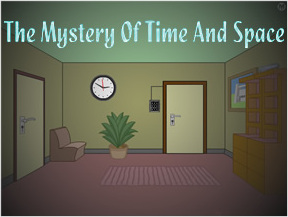
Mystery of Time and Space is a point-and-click adventure that's been around a while. Created in 2002 by Jan Albartus, the author has updated the game several times since then by adding new rooms. And, so far that I have seen, each room features a fresh new soundtrack to keep you company while you solve its puzzle. So, I am guessing the object is to simply escape each of the rooms.

In case you get stuck, there is a Java chat applet built into the game window that pops up so you can chat with others who are also playing the game. So, what are you waiting for? Go have yourself another clicky adventure. Click.

Thanks to Capuchin, Steve, Nick, and everyone else who suggested this game.

  • Currently 4.7/5
  • 1
  • 2
  • 3
  • 4
  • 5
Rating: 4.7/5 (41 votes cast)

Mystery of Time and Space (MOTAS) walkthrough now available!

Walkthrough Guide

Here's a complete walkthrough (levels 1-19)...

image
Level 1 Walkthrough
image
  • get key from under pillow
  • open locker and get screwdriver out of box
  • put wall poster under door
  • use screwdriver to take elepant pic off wall
  • then you'll get a thin screw use thin screw in door lock
  • pull out poster from under the door and get key


Level 2 Walkthrough
image
  • Get the diskette box from the top of the cabinet and go to the next room and take the lower right hand corner pin from the flag.
  • Use pin on diskette box to get the floppy out.
  • Insert the floppy disk into the disk drive on the right hand side of computer and turn computer on.
  • Now you have the 1 2 8 6 4 code...enter it into the panel by the door.


Level 3 Walkthrough
image
  • Go through the door to the floor room and switch off the light.
  • Get the 3 wall tiles and switch the light back on.
  • Move the floor tiles at a 90 degree angle to each other and create a pattern that will link top right hole to left one so that the head can move all the way across the room.
  • At the rathole next to the stairs, put the diskette box over the rat hole. Wait for the head to be under the trap to click on it and capture the head.
  • Click on right hand side of stairs to raise them. Put the three wall tiles into the slots under the stairs.
  • Pull out the wall tiles in this order from left to right pull out first tile 2 times second tile once third tile twice and then put the box with the head in it on the tiles...it should move across them if you've pulled them out right.
  • Move the chair to the left side of the stairs..click on stairs to lower stairs.


Level 4 Walkthrough
image
  • Get piece of wood out of fireplace Put piece of wood under laser burn it put it back in fireplace
  • Put triangle under laser ...break it (turn off lamp if need be for more power) put it back in panel by door
  • When putting pieces back in panel by door, put small triangle on bottom large one towards the left and fit the other pieces in after that.


Level 5 Walkthrough
image
  • smilie face pad...press the buttons in this order (if the code says 6 then count across from left to right to the sixth button and press that button and so on) 6, 7, 11, 4, 6, 7, 8, 9, 10, 12, 11, 6, 10, 1, 7, 6, 6, 9, 7, 4, 5, 11, 12, 1, 11, 6 last button is 1101
  • after you've finished the smiley panel, then go into next room, move cabinet and box, and get key from small panel on wall


Level 6 Walkthrough
image
  • Lift doormat and let key drop down through the grate
  • Fix flashlight by using batteries from radio and headlight from motorcycle (use screwdriver to get headlight)
  • Open tiles under rug in this order click upper left one then lower right one then lower left one
  • Click on hose once then click on opening once go down and find key on the floor between 2 cabinets


Level 7 Walkthrough
image
  • Get blue wheel out of picture frame in room that has the note on the table...put it on the leftmost pipe
  • Go up elevator and get green wheel out of cabinet drawer....put it on rightmost pipe
  • Find a pen and a piece of paper...the pen is in a desk drawer...(look for a room with a mailbox...there is a ladder in that room go up that ladder to the room with the desk)...the piece of paper is on a table in a room with a towel draped over a pipe
  • Put the pen and piece of paper on the clone note that was on the table should give you a letter to mail after mailing the letter then look in the bottom of the mailbox for the red wheel put it on middle pipe
  • Find floppy the floppy is in a locker the locker is in a room with a big box that says "this side up" then first put the floppy in the disk drives in teletransporter room (right hand side of room)
  • Click on the small wheels to first change the color of the big wheel at the end they should all turn grey do it in this order click small green then red...big wheel should change to blue then small green then blue...big wheel should change to purple...then small red then blue all wheels should change to grey
  • When all the wheels are grey open panel click on user input screen step into transporter


Level 8 Walkthrough
image
  • Pick up the screwdriver off of the table and go to the panel on the wall beside the poster.
  • Click on the buttons on the panel so that the numbers will add up to the number at the top of the panel and then press the "enter code" button. You will have to do this 12 times.
  • Move through the fireplace room, and then the upper right room and click on picture frame to reveal a hidden part of the room.
  • Use the screwdriver on the grating to be able to go through the opening to the next room where you will pick up the clock weights from the clock.
  • Go back to the room with the poster and number panel on the wall and press the panel which will make the wall move.
  • Go into the secret room and pull the string down from the right hand side of the ceiling fixture...then put the weights on it once the string is pulled out.
  • Take the horse chess piece and go back to the clock room...then put the horse piece on the pedestal.
  • Keep moving horse chess piece towards pedestal piece, always attempting to get it to land on pedestal piece, while at the same time trying to move both of them towards the fireplace....and then continue doing this until both pieces eventually end up in the fireplace.
  • Once both pieces are in the fireplace, then go back to the other fireplace room and go into the lower right hand room (originally the room that had the force field in front of it.)
  • Once in that room, open locker 1, put on the alien suit, open the air lock door and enter the cabin.


Level 9 Walkthrough
image
  • Open the cupboard that's by the spaceship and get a key from the box.
  • In the next room open the cupboard with the key. In it you will find a floppy disk and a big triangle.
  • Put the triangle on the broken part of the high voltage panel to fix the force field and then go back to the spaceship room.
  • Now you can enter the door that was previously locked on the other side of the locker.
  • In the room that has the computer in it, open the cupboard and you will find another key there.
  • Then go back to the spaceship room again and open the locker with the key..it will show you the word QUEST.
  • Go back into the computer room, and put the floppy disk into the disk drive and then restart the computer.
  • Type QUEST on the computer and then press the return/enter key.
  • A picture will appear with some letters...remember the letters and click on the door to change the picture...you will see some more letters in the next room...take all the letters and make a word with them and type that word on the computer.
  • Then you should get the following message: "I hope I unlocked the door".
  • Now go over a couple of rooms till you get to a room with 2 cupboards, and 2 chairs with a plant between them...open the cupboard closest to you and find a key.
  • "Here is the machine that will unlock the doors in room#7. Default position is door#1 opened in room#7. You will have to go to room#7, open the door that corresponds to what the machine shows, and there will be the exit door behind one of them. This is random so I can't tell you which door to open. Just try them all, and change which door is opened by hitting the center of the machine." Once you find the correct door, then use the key to open it.


Level 10 Walkthrough
image
  • Go to the room on the left and open the cabinet and take the white ball and a key.
  • Going back through the first room, go upstairs and open the right hand locker with the key getting the red pass card out of it.
  • Go back to the circular puzzle room and use the red pass card over the green circle at the bottom of the puzzle which will make the colored circle move down.
  • Enter puzzle and line up colors with each other red with red blue with blueetc OR...
  • Click on colored part of puzzle to enter it and then you're going to be clicking the colors "in the following order"
    1. the first one is lower right red
    2. then lower left red
    3. lower left yellow (small one)
    4. lower right yellow
    5. upper right green
    6. upper right red
    7. upper left green
    8. upper left blue
    9. upper right red
    10. upper right green
    11. lower right red
    12. lower right green
    13. upper right green
    14. upper left red
  • To enter the puzzle ...Use the red pass card on that green circle....and open the black center. Inside it you will find a key which will open the exit door in room #1.


Level 11 Walkthrough
image
  • Walk through the rooms till you get to a room with a chalkboard.
  • Open the cupboard and get a key and a screwdriver...Then pick up the chalk from chalkboard.
  • Go back to the first room where you will open the chest and find a coin in it and then go to the pool table room when done.
  • Put the white ball on the pool table, the coin in the slot, and use the chalk on the cuestick.
  • Aim cuestick mostly to the middle right hole and shoot...The reward is another key (found in front side of pool table)...use key to open door.


Level 12 Walkthrough
image
    1. click on the first button, going down, skip two, click the next, skip two, click the next all the way to the end of column
    2. always move left to right and top to bottom.
    3. Next go to column #3, skip #2 competely
    4. on column #3, click every button that has a black button to its immediate left. do this for the rest of wall
    5. the last column will leave four buttons black, but that's okay.
  • green wall solutions:
  • Once the green wall is done the wall will move. Go to the room on the left closest to the green wall, and on the shelves you will find a light bulb...take it and go to the room on the right closest to the green wall.
  • Open the left cupboard, and get the wire-cutter. Then push the right cupboard and enter the room behind it.
  • Erase the wrinkle in the rug, and move the chair over to the lamp, then get a key from the ceiling light.
  • Now put the light bulb into the lamp on the table and turn it on...read the code along the wall that appears when you move the light up and down to read the full code. There should be 8 numbers...write these down to remember them.
  • After the code is written down move locker to clear the path, and go back to the green wall room and then the lower right hand room.
  • Move the table with clock on it first, then the box, then the tall piece of furniture, then desk with green picture and plant, and finally the bed...go down in hole under bed to laser gates row.
  • Move the shelves under opening in ceiling, and then go into laser room 1 and push the red button which will deactivate laser gate #1.
  • Go into laser room#2 and open the right panel on the machine with screwdriver, and then cut the green wire with the wire-cutter.
  • Go back to laser gates row. Now you can go to the laser room#3 and press left corner of wall under window to open the secret passage.
  • In laser room 3 open the cupboard with your key, where you will find the last key and a screwdriver...now go back to laser room 1.
  • In laser room 1, press blue button. It will reactivate first laser gate, and deactivate the third one.
  • Go to laser room#3 through hole in ceiling above shelves, and go through the hole under cabinet in lamp room where you got the 8 numbers off the wall to be able to access the final room. The room you're trying to get to has a number panel in it with an E on it and a laser wall in front of a door.
  • Enter the 8 number code that you wrote down into the 123E panel SLOWLY and then press E, (it won't look like it's doing anything) and then when laser wall in front of door disappears, use the key found in laser room#3 to open the last door.


Level 13 Walkthrough
image
  • Go outside and click on the block under the wagon..then click on the manhole. This powers the elevator inside.
  • Take the elevator to floor D and click on the shelves to pick up the waterproof tape.
  • Then go to level B and put the red card on the "eye." You'll see a picturejust to the right of the eye... Click on its caption and remember the color andcompass direction. Then go further right down the hallway and do the same forthe other three pictures.
  • Return to level A. Enter the room to your right where there is a colormachine. The 4 sides rotate when you press the button on the right (not the redlever). The button on the left only changes the shape from rectangular totriangular...but I've been told it doesn't matter which way it's set.
  • Using the colors and directions from the pictures, click the small colorbuttons. To start, the side of the machine facing you is south, so use thosesmall color buttons in front to put the correct color for south on that side ofthe machine.
  • Now click on button on the right once to move the machine to west...put thecorrect color for west on that side...click on right hand button once...putcorrect color for north....click on right hand button once...put correct colorfor east..then rotate machine to let south side face you again.
  • When you have all the colors lined up on each side correctly, then pull thered lever on the right side of the machine.
  • You should now have the golden key.
  • Go to floor C. To the right of the elevator is a wall puzzle. Click on it toreveal a color puzzle. There are four sides to the puzzle...Starting in anyinside corner click until you get all the colors filled in for thatsection..then go to the rest of inside corners and do the same.
  • After finishing wall puzzle it will open up to reveal a key. Take the keyinto the room to your right and use it to open the cupboard and get the bucket.
  • Return to A level and go outside. Moving all the way to your left you shouldsee a well and a gate with a fire in front of it.
  • Take the bucket and place it at the end of the rope attached to the well.Click on it and then click on the wheel on the side of the well to bring up thebucket. Use the waterproof tape to fix the bucket, and then use the wheel todrop and raise the bucket once more.
  • Click on the bucket with water and use it to put out the flames and then usethe golden key and unlock the door.


Level 14 Walkthrough
image
  • Go out the door on your right, go to the end of the street, go right to the park, then right again to the mill.
  • Get the axe on the stump.
  • Click on the axe, then click on the piece of sandpaper near the left corner of the screen. This will sharpen the axe. Now you will need to sharpen the axe on all the other pieces of sandpaper located in flood control, front end of the street, underneath the container in the first room, and the room to the left of that one.
  • When your axe is fully sharpened, go back to the mill.
  • Use the axe to cut the rope that is holding the windmill down.
  • Go to flood control.
  • Click on the buttons until the boat is all the way to the left side. You can do this by clicking the buttons in this order: 3, 2, 1, 3, 2, 3, 3, 3.
  • Exit flood control and go to the park.
  • Use the rope to get the spade from the boat that is now floating down the river.
  • Go back to the front end of the street and use the spade to knock down the pair of pants hanging from the wire. You will get a key.
  • Go back to the original room, then the room left of it with the projectors. Write down the numbers on the wall.
  • Go to the end of the street and unlock the door to the left.
  • You will need to solve this color block. Start by getting the movable piece to the top-left, then the one on the top-right, the one on the top-middle, the one on the bottom-right, the one on the bottom-middle, then the one on the bottom-left.
  • A panel will open up where the color block was. Click on the circle on the left side of this panel.
  • A doorway to the left will open. Go in and enter in the code you wrote down from the projectors.
  • Go right, and use the screwdriver to knock down the panel. Enter the hole.


Level 15 Walkthrough
image
  • Use the screwdriver on the panel in the bottom-left corner of the screen. Now put the screwdriver where the panel was.
  • The four screens will light up, and you must put them in chronological order of the game.
    1. First screen of the game, the bedroom you wake up in.
    2. The second screen of the game, has a clock on it.
    3. The bridge.
    4. The end screen with the table and talking robot.
  • Enter the door to your right.
  • Click on the ball on top of the pole in the middle of the screen. A portal will come down, and you enter it.


Level 16 Walkthrough
image
  • Go into the second doorway to the right.
  • Read the note on the right wall.
  • Flip the switches according to the note, and the power will come back on.
  • Exit that room, and go into the first doorway on the right.
  • Click on the icon 'My Computer.'
  • Click on 'Desktop Images' to change the background.
  • Click on 'readme.txt.' Write down the password at the bottom. It will be taters***.
  • Exit out of the window.
  • Write down the numbers after 'UNOX Operating System v.*.**.
  • Open up 'My Computer' again.
  • Click on 'Password Settings.'
  • Enter taters*** into the top text box that says 'Enter Password.'
  • Enter *.** into the bottom-right text box that says 'UNOX Version.'
  • Click the LOGIN button on the bottom-right corner of the window.
  • Click on the last icon in the last column on the right. It will be titled BLENDER.
  • Write down the numbers that appear in the middle of the screen *.**.
  • Exit out of the window.
  • Go to 'My Computer' then 'Password Settings.'
  • Enter the numbers you just got into the text box that says 'Blender Version' then click LOGIN again.
  • Now go to 'My Documents.' Click on the Saved Email Folder and click on the Document that's in it.
  • If there are a lot of boxes and no spaces between any of the words, click on DECODER 2. If the words are spaced out, you don't need to click on anything. Once the words are spaced out, scroll down to the bottom of the page. Write down the numbers. Exit the window.
  • Click on the START button, then click on UNLOCK THE DOOR.
  • Enter the numbers you were just given into the text box, then click UNLOCK THE DOOR.
  • Exit the room.
  • Click on the square panel in front of you in the middle of the screen. It will open.
  • Go outside.


Level 17 Walkthrough
image
  • Go to the left.
  • Click the bottom-right of the window so the target is now on the UFO.
  • Click on the arrows in this sequence: Up, Up, Right, Right, Down.
  • The UFO head should fly off. Click inside the UFO, where the head just was. You will get the MOTAS device.
  • Click on the MOTAS device, then on the third orb that appears. You will be taken back to a previous level. Pick up the screwdriver on the chair.
  • Click on the second orb.
  • Use the screwdriver to open up the door marked 2. You hide inside and watch your former self go by. You will get an IC board.
  • Click on the first orb, and put the IC board in the UFO.
  • Click on the third orb.
  • Click on the broken UFO to get another IC board.
  • Click on the first orb and insert the other IC board into the UFO.
  • Click on the UFO and read the note that was beneath it.
  • Now when you click on the MOTAS device again, a fourth orb appears. Click on it.


Level 18 Walkthrough
image
  • Enter the screen to the right, and click on the big black block. It will move aside to reveal a note.
  • Click on the note and write down the numbers.
  • Go back to the left screen, and enter the numbers by clicking on the dice looking obects.
  • Once the correct code is entered, a panel will slide up. Put the MOTAS device in the insertion slot at the bottom of the panel.
  • Make sure the two bottom circles nf the panel are pointing toward the MOTAS device and the one on top is pointing upwards. The little triangle switches need to be up, down, up, down, up. When the MOTAS device is floating, pick it up.
  • Click on it, then click on the second orb.
  • Click on the alien and the UFO. The alien will get in and fly away.
  • Click on the note it left behind.


Level 19 Walkthrough
image
  • Go one screen left.
  • You can click on three things: the big green button, then the two smaller knobs. Click on both of the knobs, then on the big green button. This will put you in the future.
  • Go as far right as you can. You will see a big tree, a fence, and a seed. Pick up the seed.
  • Go back into the room with the three buttons. Click on the left knob, then the big green button. This will put you in the past.
  • Go all the way to the right again, to the room with the tree and fence. Now there will be a ladder on the right side. Pick it up.
  • Go back to the room you started in, the one to the right of the three buttons. Put the seed in the plant pot.
  • Go right and click on the left knob then the big green button to be in the future again.
  • Go right to where you planted the seed. Put the ladder against the plant pot and fully grown tree.
  • You can now go into the room above. Go up then right. Click on the bookcase and write down the code.
  • Go back into the room with the buttons. Click on the right knob then the big green button. This will put you back in the present.
  • Go into the room on your left and enter in the code you were given.
  • The panel will slide open. Enter in.

Comments (may contain spoilers)

Yeh! I finished, Thanks to all the spoilers and hints on this page!!!

image
Level 18 - The Diodes need to be swapped around.

help!
level 19

image
in the future when you climb up the lader to the loft how do you get the code from the cupboard

thanks if any one was gona reply or had

image
I noticed one of the books at the top could be clicked and it had the code in it

I still can't get the boat to the right, in level 14, even though i looked at booth walkthrus , the order is soppose to be

image
3, 2, 1, 3, 2, 3, 3, 3,
but when i tried it it didnt work,
please help!!!

i need help on lvl 16!!


image
after getting e numbers from the blender, i entered it in but i cant get to e nxt step! all e icons are now unavailable!! someone help, please??

nette: do this. Go to my documents, and go to the notepad thing. Go to the very bottom (you don't need decoders), and there should be a six digit number. Write it down, and then press start. It should say unlock the door. Enter that six digit number and it unlocks the door!

Help level 16
Got the blender code cant get into my documents even with walkthru

When will level 20 come out? hungry for more this game so fun :(

I dont get it. There are all those people on the chat that can mess with the bot. How can you get like that

I'm stuck on lvl 16, entered all required info have nothing shown of "My Documents" what am I doing wrong

i need help on level 13.

HI There

I cannot find level 14 and beyond after level 13 there is a robot and goodbye basically, please help

I got stuck on an old version that only has through 13. Do I have to start over?

You have an old version. Visit www.albartus.com (or any of the links above) for the new version with 19 levels. Okay, here is my own walkthrough.

image
Level 1: Click on the poster, put it under the door, and click on the pillow. Use the key to open the locker. Use the screwdriver to pull down the painting and get a nail. Put the nail through the keyhole, and pull the poster back out. There should be a key on it. Open the door with it. Level 2: Click on the box on the bookshelves. Go into the left room. Get the bottom right pin from the flag. Use the pin to open the box. Go to the computer, put the floppy disk in, and there should be a code on the computer. Use that code in the other room, and the door should open. Level 3: Go into the right room, and turn the lights off. Get the 3 loose tiles, and turn the lights on again. Notice the lines on the floor? Turn them so the rathole from the right leads to the rathole on the left. Go into the left room. Put the box you have on the rathole, and close it. The rat should be in it. Click on the right bridge part, and put the three tiles in the slots. Click on the left one two times, the middle one once, and the right one two times. Put the box with the rat in it on the tiles. Next, put the chair next to the left bridge part, and click the left part. Open the door. Level 4: Go into the left room. Get a firewood piece, and click on the grey thing next to the door to get a triangle. Go to the very right room, and put the firewood on. Press the green button. Put the burning firewood in the fireplace in the very left room. Go to the very right room, and put the triangle on. Press the green button. Go to the very left room, and click on the grey thing next to the door. Put the big triangle piece on the top left part. Put the small triangle on the bottom. Put the two other shapes in the top right place. It should unlock the door. Go to level 5.
Levels 5-10 of my walkthrough are coming after my fingers rest a little. =/

Okay, here are the levels 5-10 walkthrough. For level 5,

image
Move the big box and the cabinet to reveal a door. Go in there. Click the green thing next to the door. You should see happy faces. Click on the sad face. Click on F, the circle, fifteen, the 5 pointed figure, the sixth button, the second white W, the figure with 4 sticks, the first P, the octagon, the figure with 2 curved lines, the second green castle, the blue figure with a space in between, the first button, MS, the sixth button, the button with seven dots on it, the bottom-left button, the seventh button, the top right button, the fifth button, 7:3, 2042, the first button, the second to last button, the button with only one line, and 1101. Go back into the last room, and move back the cabinet and the big box. Open the small panel. Get the key, move the things back, and open the door with the key. Level 6: Click on the welcome mat, and the key should fall through the grating. Go into the next room. Get the batteries from the radio, open the curtains, and put them in the flashlight. Open the cabinet, and get the screwdriver. Use the screwdriver to get a light from the motorcycle. Put the light in the flashlight. Get the flashlight. Move the rug, and push the tiles until they all fall down. Use the fire hose to go down. Use the flashlight to see. Open the door, and shine your flashlight to the left. The key is there. Get it, go all the way back up, and open the door. Level 7: Go into the left room. Click on the blue wheel in the painting, and go back into the right room. Put the blue wheel on the left pipe. Ride the elevator up. Open the door, and click on the top drawer in the cabinet. There should be a green wheel. Go back down the elevator, and put the green wheel on the right pipe. Go back up the elevator, and keep going until you are in the room where you can see the stars. Open the right drawer, then go to the right, down the ladder. Get the piece of paper, and go all the way back to where you found the blue wheel. Put the paper over the letter, and trace it. Get the letter, and go all the way back to the Mail-Snail box. Put the letter in, and wait for about 10 seconds. Then click on the in-box and get the red wheel. Insert it on the middle pipe with the blue and green wheel. Go all the way to the second to last room. Click on the locker. You should get a floppy disk. Go into the next room, and insert the floppy disk there. Then click on the mini red and green wheels, the green and blue wheels, and the red and blue wheels. Click on the panel in the transporter. When it says "Ready for user input", step in. Level 8: Grab the screwdriver. Click on the red dot. You will see a number. Use the numbers to add up to the number on the top. Keep doing this until the dot is totally green. Zoom out, and click on the green dot. Go as far as you can right. Click on the blank frame. Use the screwdriver to get the grating down. Get the clock weights in the next room. Go all the way into the very left room, and click on the string hanging. Put the clock weights on it, and grab the chess piece. Go all the way to the very right room, and put the chess piece on the orange thing. Now, if you don't know how to play chess, you are going to have trouble. Move the knight to the orange spot on the board, and keep doing this until there are no orange spots left. Then, go two rooms to the left. Go into the red room. Open door number one, and grab the alien suit. Open the air lock door, and step in. Level 9: Open the cupboard, and grab the key in it. Go into the auto door closest to you. Use the key to open the other cupboard. Grab the triangle and floppy disk inside. Use the triangle to fix the high voltage problem. Go into the other auto doors now. Put the floppy disk in, and turn the power on. Enter the word quest. You should now see letters in rooms. Use the letters to form a word. (RED, WEST, WARD) Enter that on the password thing. It should open the auto doors. Go into the next room, and grab the key inside the cupboard. Next, go into the right room. Open the door with the square on it. If there isn't another door in it, go back out, and go into the most left room. Click on the square, and it'll split into two shapes. Go into the door with that symbol. Do this until you find the correct door with another door in it. Open it with the key. Level 10: Go into the left door, and open the cabinet. Go back into the right door. Go upstairs, and use the key to open the locker. Get the floppy disk inside. Go back into the room where you got the ball. Put the floppy disk on the green scanner, and a puzzle should come down. The object is to get all the pieces matched together with the color on the outside. For example, if there is green on the outside, try to get all the green there. Do this with all of the colors. Next, put the floppy disk the the scanner again, and the puzzle will go back up. Click on where the puzzle used to be, and you will find a key. Use that to open the door in the right room.
Next, levels 11-14 walkthrough! Including: The green wall! Going outside! But for now, my fingers are VERY tired. Maybe I'll do it in a few days.....

Okay, levels 11-14 of my walkthrough.

image
Level 11
image
Go all the way right until you can't go right anymore. Grab the chalk from the chalkboard. Open the cupboard to get a key and a screwdriver. Next, go all the way left and use the key to open the chest with the keyhole in it. You should get a coin. Next, go right. Put the white ball into the game of billiards. Next, put the coin in. Scrub the stick with chalk. Aim three notches to the left from your point of view ( Level 12
image
Go right, and then you should notice the infamous green wall. (right now it's gray.) Just start at the top-left corner, and get the whole column green. Then, move on to the 2nd column. Focus on getting that green. Don't worry if any other columns are grey, because you'll fix them later. Once you get to the last column, there should be 4 grey spots left. But, the wall fills them in anyway, so the wall will move back. Next, go into the left room the green wall revealed. Click on the shelves and you should find a lightbulb. Go into the right room the green wall just revealed. Open the cupboard farthest away from you and you should find a wirecutter. Next, click on the cupboard closest to you, and click on the side that doesn't have a handle, to reveal a secret passage. Go in there. Fix the wrinkle in the floor, and move the chair. Click on the lamp and you should find a key. Next, click on the locker, and it should reveal another passage. You can't go in yet because it is blocked. Put the lightbulb into the other lamp against the wall. Go back to where the green wall is, and go into the right door that was already there before you figured out the green wall. Click on the desk the alarm clock is on, then the box, then the wooden structure, then the desk, then the bed. It should reveal a passageway. Go in. Go in the room that is availble to you, and press the red button. One of the red lines disappears. Go back into the hallway, and go into the room that was sealed off before. Go into the room now availble. Use the screwdriver on the three panels that are below that machine. Use the wire-cutter to cut the GREEN wire. The middle gate should power down. Go into the next room, and you should be in another room with a machine. Click on the left wall, and you'll find out it is a fake. Use the key to open the cupboard farthest from you. Then, go back into the hallway. Backtrack back to the first room that controls the red gates. Press the blue button. Move the shelves, and go all the way back to the room with the lamp against the wall. Press the button on it, and it should have an 8 digit code. Remember it, or write it down, and go into the secret hole in that room. Go into the hallway from there, and the red seal isn't there. So go all the way down, go into the left room, and you should be in a room with a button 1, 2, 3, and E. Enter the 8 digit code that the lamp revealed (if you only got 3 digits, you didn't move the lamp. Click on the lamp to move it.), and press E. The red seal should disappear. So use the key to open the door.
Level 13
image
Go into the left entrance. You should be outside. Click on the wooden thing next to the wheel to release the carriage. Click on the manhole, and go back inside. Go to floor D, and click on the shelves. Go to floor C now. Click on the wall next to the elevator to reveal squares. Click on the very outside, and work your way to the inside of each square as the squares light up. If they just flash, you clicked on the wrong side. Do this with all 4 big squares to reveal a key. Grab it, and go into the next room. Use the key to unlock the cupboard. There should be a pail in it. Go to floor B, and give the card to the eye. It should reveal paintings. Click on the words, and it should say something like, "In the north, the sun shines yellow". Write these down, for north, south, east, and west. Go to floor A. Go into the right room, and you should see some sort of machine. Click the color button to change it to what the west direction was. Turn the machine counterclockwise. Next, set the color to what the north direction was. Turn it counterclockwise again, and set it to east. Turn it. Set it to south. Then Press the red lever, and a golden key should come down. Grab it. If you didn't understand, for example, if west said, "In the west, there are many green trees", set it to green. Now go back outside, and go all the way left. Put the pail on the the rope on the well, and send it down by clicking on the pail. Roll it up, and it should leak. Put some waterproof tape on it, and send it back down. Roll it up, and it should be full with water. Dump it on the fire, and use the key to unlock the door.
Level 14
image
Go in the right door. Go all the way to the end of the street, and go to the park. Go right again to the windmill. Pick up the axe, and sharpen it on all 5 sandpapers. (Flood control, on the street, in the room you started in, push the container aside to reveal another room with sandpaper, and next to the windmill.) Once you have done that, go back to the windmill and cut the rope on it. Next, go to the flood control. You will see a mini boat. Get the boat to the other side by experimenting with the water. If the water is very high, try pressing the last button to raise the water level so the boat can flow. Once it is at the other side, go to the park. There should be a boat. Use the rope to get the spade on it. Go back to the beginning of the street. Use the spade to bring down the pants hanging there. There is a key in there. Go back to the room you started in. Go left, and there should be a 5 digit number on the wall. Remember it, and go to the end of the street. Use the key to open the left door. Go inside. You should see red squares. Make it so the red squares form 4 big squares, and the wall will slide up. Press the oval on the inside, and the clock should slide over. Enter the 5 digit code on the wall. Go back into the room, and use the screwdriver to break the cracked wall. Go in there to level 15.
Okay, levels 15-19 of my walkthrough coming soon!

Here are the final levels of my walkthrough for MOTAS!

image
Level 15
image
Use the screwdriver to open the panel below the screens. Next, PUT the screwdriver in to activate the power. Next put the screens in chronological order from left to right from when you first started to the "To be continued" screen. Go outside. Click on the ball right in front of you. Next, go into the portal.
Level 16
image
Go into the farthest room from you. Read the note on the wall. It should say a code with 1's and 0's. Put the levers in that order. One is down, and 0 is up. It may not do it the first time you do it, but just switch them around a little, then do it again, and it will activate the power. Go back into the hallway, into the other room. There should be a computer. Go into my computer. Click the "README.TXT" and it should say the password, "taters###". Next, switch desktop images. Close the window, and you should be on UNOX version #.##. Go to password settings, and where it says "Enter Password", put the taters number there. Where it says UNOX version, put that there. Click login. Now you can go to blender! Check out that version, and then go back to password settings. Put the blender version number there, the UNOX, and the taters number, and now you can go to my documents! Go there, open the document and click a decoder, and go to the very bottom. There should be a number. Remember that number. Close the window, and click "Start" in the bottom left corner. Click unlock the door. Enter the number that you saw on the document. Go back into the hallway, and open the door at the end of the hallway.
Level 17
image
Go left. Get the target to the bottom right corner of the UFO. Press Up, Up, Right, Right, Down and the lid should fly off. Click inside the UFO. Click the device, and click the third ball. Click the UFO in that place, and grab the screwdriver on the chair. Go to the second ball. Use the screwdriver to force open the door. Go back to the first ball. Put both IC boards in the UFO and click on it and it will take off. Click on the note, and then click on the fourth ball.
Level 18
image
Go right. Click on the metal box to reveal a note. It should say some numbers. Go back into the left room, and click on the dots until the number of green dots matches the first number of the code behind the metal box. Do the same with the other two. The wall should open. Put the MOTAS device in, and turn Click all of the ARROWS once. Click on the top left "K" next. The MOTAS device should be floating again. Go to the 2nd orb and click on the UFO and the alien. Time should go backwards. Click on the note, and you're in level 19.
Level 19
image
Go left into a room with a time machine. If you press the right button and press the green button, it takes you into the past. If you press the left, it takes you into the present. If you press both right and left then the green button, it takes you into the future. So start by going into the past. Go all the way right as far as you can (you'll notice blocky graphics), and grab the ladder. Go back to the time machine, and go into the future. Go back to the tree (you'll notice really good graphics), and grab the seed. Go back into the past, and plant the seed in the pot. Go into the future, and put the ladder against the tree by clicking on the pot. Go right and click on the books. It should say a four digit number. Go back down and go into the present. Go left from there, and enter the four digit number that you read from the books and the door should open. That is level 19! The last level.
..
Hope my walkthrough helped you get through!

having trouble with alien and UFO in level 18....tried to click on both, but they do nothing....the alien moves, but when I move my cursor, he stops...Help please!

I need help on the green wall

Has anyone had an issue with Level 3.

image
I've moved the carpet squares, but the head continues to go in the holes on the right (not following the line to the left).
Is there a game glitch or something??

Jenn
There is no glitch. You just have to change the path that the head has to follow.

help! stuck on lvl 17. i put the IC board into the ufo. i looked at the walkthrough, and i cant get the other ic board! i clicked on the broken ufo and all it says is "i better not touch it, it would create a paradox" how do i do this???

please! i need help on level 14!, how do i get the boat to the far right in the flood control center! i'm going insane trying to figure this out! i need to know what buttons i'm supposed to press in order to get the boat the other side of flood control

How do i use the pin on the diskette box?

I'm stuck for 3 days at level 9. How can I type the word with the letters in the two rooms? The keyboard doesn't work!!

help please! on level 16 i can't flip the switches right! i looked at the code on the wall but im still confused please help!

Please help!

On level 16

Are there any other games like this only i have completed this one and i want to do another one.. thanks.x

I dont get it! where is the walkthrough?!

[Edit: click the button that says "Show Spoiler", it will reveal the walkthrough. If it doesn't work, try enabling Javascript first. -Jay]

WoOt!!! finally beat it

Stuck on level 16! Followed the walkthrough, but as soon as I entered the Blender Version and hit login, I no longer had access to anything on the computer screen, except for "my computer"!
I've reloaded the level twice but still get the same result!

mel
Did you put the Unox Version no. in at the same time?

jan, I tried putting just the blender #, putting the blender & unix #'s, and then tried both #'s and the password at the same time, but always the same result. I can't figure out what I'm doing wrong!

I need help with level 18 i clicked on the alien and the U.F.O. but the alien won't fly away. Can someone tell me what I'm doing wrong?

I have a feeling that in level 7, you need to get in the tele-transporter. I turned all the wheels grey. How do I get in, what do I click?

I've been stuck on level 16 also. After hours of trying I finally used the walkthrough but I cannot get access to my documents. There seems to be a glitch here for some of us.

Can't wait for more! Loved it!

How irritating is this. I'm on Level 14. Tried cutting the rope with the axe before I realised there was a fourth piece of sandpaper in the projector room. Now I've used all four and it's still telling me my axe isn't sharp enough... What am I supposed to do now? Go back to the start?!?!

How irritating is this. I'm on Level 14. Tried cutting the rope with the axe before I realised there was a fourth piece of sandpaper in the projector room. Now I've used all four and it's still telling me my axe isn't sharp enough... What am I supposed to do now? Go back to the start?!?!

Nadine
You need to find the fifth piece of sandpaper.

On level 7, I don't understand how to put down the piece of paper and pen on the "clone note". What does that mean? Which table? I have tried holding the paper and pen and clicking on every table. Nothing happens. Hint?

lorac

image
The note you have to trace over is on the desk to left of the room that you started in (the room where you are sticking the coloured wheels in).

Help i got the password and the univox number and the blender number also got access everything buy when i click start it says no access? what the hey?

Lola
Level 16?
Have you looked in "My Documents"?

Help! In level 9, at the computer, when you get the 4 letters, where do you put the letters in? And when i turn the computer off, then put the letters in, it doesnt work.

Alicia

image
As soon as you see the 4 letters on your screen and have figured out what word they make, put the word into the keyboard on your screen. The letters will not show up on the computer screen as being typed in but once your click on "enter" on the keyboard a message should appear on the bottom of your screen saying that something has happened. This means that the doorway to the right is now unlocked.

wow this game is pure class. does anyone know if the creator is still adding rooms? i think ill have another crack at this game in a month or so and see if there is a room 20. cheers for this peach jay :-)

Argh, I can't get past the smiley face codes on Level 5. I click on button 6, I get the letters. But then what? >_>0

Ligaya
5
The walkthrough above tells you all the buttons to push.

ho do you pen the door in level 3 with the birdge thing and the stone tiles

I need help on level 9!

image
I typed in the word Quest, and then there are the letters G, T, E, R, and A. What word do I make?

I have been at the tree with the ladder...I cannot get the tree to get any higher than just below the opening in the celing. I am in the future with the ladder BUT I can't get it to lay against the tree so I can get the heck out of level 19

Help.......

JAN
You must have planted your seed in the present. If you plant your seed in the past it will grow to ceiling height in the present and poke through the hole in the ceiling in the future.

I have the same problem as some others here, in level 18 I keep clicking on the ufo and the alien, but nothing happens. I've tried going back en making the MOTAS float again and again, but nothing works.

Also, in another walkthrough it says the alien will step into the ufo and fly away...

Anyway, nothing happens!!!

SOmebody help me on lvl 12 imfamous wall tell me it for each column or make a video and send t to my email address plz help!

Inderpal
The walkthrough above gives you a link to the green wall solution :D

METTAN
The word you want is "great".

Okay i read the walkthrough but i still can't fiqure out the green wall can someone make a video of it on youtube so i can see how to do it?

ok... i'm stuck on level 9...

I found 5 letters in two rooms... (D,R,F,A,W).. I don't know what to do... Please help as soon as possible!

level 9 - i enter the word draw and nothing happens - Do i need to reset - HELP

im stuck on lvl 12, stuck in the basement with the lazers dunno what to do. can anyone help me plz?????

AAA!!! STUPID FIREFOX!!! I can't see the code on level 18 because the string with it goes beyond game screen!!! DAMN IT!!!!!

vicky do this. The letters are scrambled. They make DWARF. Reset the computer and type that in as the password.

I beat this game in 51 minutes. Then again I've done this before.

OK... great game and all, but I got to level 11 and...

1) in the room on the far left, the text was nonsensical - i.e. The wrong object labels kept popping up and I was getting lines of text from earlier in the game instead of ones relevant to where I was, much of it ending in: _root.myTranslation.mytext.

2) I managed to get through the level anyhow, got the key from the pool table, unlocked the door, and stepped through... into BLACKNESS.

3) reloading the level resulted in the same...

4) and then my cursor disappeared within the game window.

And I was just getting to the fables green wall :(

Any ideas why? I'm using Firefox, but this seems to be a bug within the game itself, no?

why cant i enter the flood room on lvl 14? i click on it, see the feet cursor, but i wont go in. does anyone know why?

nevermind. i figured it out.

I am stuck on level 12. After I cut the green wire, I went to the opened room now available and clicked on the fake wall, but nowhere between the other room and that one did I find a key. If anyone would be so kind as to help me, I would really appreciate it. Thanks so much.

I am also having the same problem as mel and lola were having. whenever I put the unox number, password, and belender number in, I no longer have acess to anything on the screen except for my computer, PLEASE HELP!!!!!!

ugh, level 19! I have the ladder and I've grown the tree, but I can't place the ladder against the tree! I'm so frustrated, help please!

grr...my tree is there and i have the ladder but i keep clicking and i cant put it against it....(level 19)

i click on the alien and the ufo but nothing happens. iv restarted the gam twice but i cant seem to get passed it! someon PLEASE HELP!!

I dont get it! I am on level 9 and I got my four letters, but I have tried EVERY combination of the four and none of them work! Some of the ones I tried werent even words. HELP!

still can somebody tell me how to get past the computer on lvl 16

For level 19, I figured why some people couldn't use the ladder on the tree:

image
put the seed in the pot while you're in the past, not in the present...So the tree gets enough time to grow, i guess. Then get back to the future, the tree should be so big you can't see the leaves

Level 16

I enter everything correctly but still have no access to my documents. i have access to My computer and blender but nothing else. I followed the walkthrough.
Is this just a glitch? it is very frustrating.

Everyone having trouble with level 18, I think there's an error in the walkthrough.

image
You have to make the orb float twice (or maybe it matters which way you make the orb float). If you switch the top switch and the row of five, it'll float again. Then when you go into the past and click on the alien, it will reverse time. (I had to wait a few seconds for the animation to start.) Anyway, play around a little with the two ways you can make the orb float. When I just followed the walkthrough instructions, I could go into the past but not reverse time. I found another walkthrough on the web that worked

I dont understand... Im on level 13 and have looked at the walkthrough... (both of them) and they both say that the colour machine is facing a different direction when I walk into the room... I have tried them both and put the colours in... But I have no golden key!!! Please help me!!

i'm having the same problem as leanne

nevermind, i fixed it
leanne you might want to try pressing load game then restarting at 13

Stuck on level 16 got all 3 codes press login then nothing happens apart from cant get into blender doc. tried all the walkthroughs cant see what im doing wrong. Can anyone help? Is this a glitch or me being stupid?

okay... stuck way back on level 4!!
I

image
got the panel pieces put back into the security panel and it's working
but door is still locked!?

haha...nevermind!

i am stuck on level 16 i think it is.
with the computer.
i have got all the codes and put them in correctly,
i know i have
yet it wont let me click 'my documents' as the walkthrough says...

what do i do.. can u help me please :)

xxx

help! stuck on level 4, the laser will NOT cut the stupid triangle...AUGH!
pls somebody help me so stuck!

On Level 14, I am not able to access the fifth piece of sandpaper.

image
I assume that flood control is the door that is on the right of the street (immediately past the clothesline). I can open the door, and the cursor changes to footprints. However, when I click, there is just a clacking sound and nothing happens. Other people have complained of the same thing but there were no replies. Am I doing something wrong or is there a glitch?

Thanks in advance!

hey can somebody tell me how to put alien into UFO n send him in level 18 i tried repeating n restarting but of no use. please help. i m just one level far off

Needing assistance on lv 18...

image
when i'm sitting there in the past with the alien and the UFO, what do i do? more specifically than clicking on the alien and the UFO, since that refuses to work out so easily

Same problem as thesource, cant read the code in 18 because it runs off the screen. Is it just a firefox-bug or something else?

I have a question: How do you get to the mailroom in level 7? The spoiler doesnt help me out.
-Leslie

On the green wall, I've got it down to 52 clicks. Does anyone else know a faster method with fewer clcks?

OMG!!! I FINISHED IT!!!! YAAAAAY!!! 3.15am Took me hours and i'm not ashamed to admit it.

Had some real trouble on level 16 with the computer. I've noticed other people have as well but no one seemed to have put up a solution so here's a couple for ya.

Problem 1. I couldnt acsess my doncuments even though I had put in the codes

Solution - For the second password dont put in the V eg. instead of V*.** just put in *.**

Problem 2. Okay so I had messed around with the codes for quite sometime and then it wouldnt let me type in the codes at all!!

Solution - Reseting the level 300 times doesnt work lol and I doubt anyone would want to start again at this point. I found if I reset the level once and then clicked as if I was going to join the chat room then went and switched the power on and went to the computer it let me type in the passwords again.

Hpe this works for anyone else who had these problems

wow this was ridiculously hard. i had to have some help doing it, but FINALLY finished!!! YEAAAA. took a couple hours too

=(

when will the next one come out??

great game!

To SNOWFLAKE (March 6, 2008)

Thank you ever so much for your solution at level 16.
I had to start the game all over again, because I got stock the first time I started level 16 until I saw your solution. Many thanks again!!

This is definitely a 10-stars game!!!
I just visited the website of the creator of this game, and there are 5 other games on it. Free to play.

Go to http://www.albartus.com

help with level 15!?!

image
I am at the TV moniters and I cannot seem to get the things in the right order no matter what! help?

im stuck in lvl 17..

after the UFO took off i clicked on the paper

and my device's gone

i dont know that to do~~~

any help??

oh finally i finished it...

waiting for lvl 20 to come out :)

i need help with level 15 too...i have the same problem as jesse..please help!!!

Comment Preview

Leave a comment

  • Please consider creating a Casual Gameplay account if you're a regular visitor here even if you already have a TypeKey identity, as it will allow us to create an even better experience for you.

    To create a new Casual Gameplay account YOU MUST SIGN-OUT FROM TYPEKEY FIRST (if already signed in).
  • Out of respect for our international community (some use page translators), please use English. Comments containing IM-speak gibberish will be deleted. (if u rite like dis, dun bother).
  • You may use limited HTML tags for style: (a href, b, br/, strong, em, ul, ol, li, code, spoiler)
    For code snippets or ascii art, use code tags for monospaced font and to preserve whitespace.
  • To post spoilers, please use spoiler tags: <spoiler>example</spoiler>
    If you need help understanding spoiler tags, read the spoiler help.