


![]()
Hot on the heels of our first game design competition, the impetus for which was Simple Andy's brilliant collection of simple puzzle games known simply as Click Drag Type, comes another installment of the series that includes five (5) brand new puzzles!
Click Drag Type 3 picks up where the others left off. In fact, this collection includes a brand new interface that houses all three puzzle collections in one.
So what are you waiting for? I'll be back with a more complete review once I finish playing it myself. Click Drag Type.
Click Drag Type 3!! walkthrough now available!
Comments (may contain spoilers)
Ok, I'm completely stumped on 9. The slider slides the bars back and forth, but I can't get them to do anything else. Clicking, draging, nothing works. Is it bugged?
For puzzle 9:


Here two clues for puzzle #8 (boards/planks/logs/...)
Me :

frustr8d :

IMHO:
#11 was a bit too complicated with the two different puzzles in the same 4x4 square, but easy once I got that.
#12 was a bit difficult but fun once you figured out the beginning part.
#13 was by far the easiest out of all of them (in CDT3).
I never really did 14. I mean I figured out how to do it, but actually moving the cursor around on the grid was way too hard and frustrating to actually sit and do. (Kudos to those of you who actually sat and did it.) If there was an easier way to make the cursor move around the grid, #14 would have been great.
#15 was a very unique, good puzzle to solve.
I liked these puzzles - keep them coming!!
Do any of you know where I can find a complete walkthrough of this game
i dont get 15 everytime i get the green and it turns purple, the thing disapears
What's up with #13??? I have everything in the correct order, see inside spoiler tag below for more on that, but it won't light up the green arrow and let me finish the puzzle. Am I missing something here?

I charged up the battery, and started rearranging the blocks into the following order from Top to Bottom:
1. Green/Yellow
2. Yellow/Blue
3. Blue/Red
4. Red/Aqua
5. Aqua/Pink
Is there anything else I need to do, or am I posting a bug?
i need help on 11 it doesnt do anything when i put the colors in the batteries
Im stuck on 9, could somebody please help?
Hey! Awesome puzzles. I loved them (and hated some of them, cause I couldn't get em!). I'll look forward to set 4 ;p
#14 much more clear spoiler.

First, circle the "hint" button in the upper right.
There are four sets of shapes. These will flash. Note the order in which they flash.
For example, when I did the puzzle, the left-most set of symbols flashed in this order: 3412. The topmost flashed in this order: 2341
If you click on the bars with the symbols, the bars will move across the screen in a certain direction.
In the empty grid, one of the squares is highlighted blue. You can move it around by dragging a line from where it is to an adjascent square.
To solve:

Start with the leftmost bar. Find the symbol that flashed first. Move the blue highlight cursor to the first square in that row. Draw that symbol that flashed first in that square.
In my example, the 3rd row flashed first. The leftmost bar goes from left to right, so I drew that symbol into the first column of row 3.
Find the symbol that flashed second. Move the blue cursor to the 2nd square in THAT row. Draw the symbol that flashed second in that square.
repeat until you have 4 symbols in the grid for the 4 symbols in the leftmost bar.

The rightmost bar travels right to left, so "1" in the rightmost bar means the last column, 2 means the next to last, etc.
The same inverse logic goes for the bottom bar as compared to the top.
This is complicated to explain without a video or something.

I've got all the levels done except 7

Hooray!!!!!!!!!! beat lvl 5
i was playing level 12, and one of the plugs didn't have a cord, a little glitch
in level 13 , how do i drop the blocks without them breaking?
ALL RIGHT!! I beat level 14!!
Complete Walkthrough (no hints just plain solution):
Level 1:

Level 2:

Level 3:

Level 4:

Level 5:

Level 6:

Level 7:

Level 8:

Level 9:

BOBGY
GBOBC
CRY
BGYPCRYO
BC
YGBO
OYRCP
Level 10:

Level 11:

Level 12:

Level 13:

Level 14:

Level 15:

SlvrLegnd:
you need to push the little green arrow at the top left once they are in the right order
Im stuck on level 6, i know how to do everything, like move the nailgun, move the wood, fire the nailgun, and bring down that little crane thing!!!!!!!!!! Can I have a little Hint??????????
WOW LEVEL 11 WAS HARD!!!!!!!!!! but i beat it. i will never share my secrets!!!!!!!!!! muahahahaha!!!!!!!!!! (if you really need help you can email me at jacobsteffler11-95@sbcglobal.net)
Does number 5 have anything to do with the rods?
We're really stuck on puzzle 8, we've got all of the logs in place - they're all green and right, but the last one wont work!!! It just wont go green! What shall we do?
thanks bbz xxx
looked at eli sherer's walkthrough but I dont get any of it help me please
OK I have only number 12 to go..I understand with the numbers making the light bulb light up, but I dont understand what to do with the bars, and the little black things that are on each side.Help please, I am soo close, and this one is driving me crazy!
I seriously need help for 7, anything?
Level 7

I'm stuck on 5 I know how to do it I just don't know how to make it be over. when i press the check button nothing happens
Argh! I got a taste of the fun from numbers 11 and 12, but number 13 crashed the program and now I can't get back to it. :(
Yes! I finished them. I absolutely love these...
MORE! (Please)
On that frustrating Level 12 *bug* ...
I actually thought it was a design feature at first, bracketing where you were allowed to put the black stops, and forcing you to carefully figure out the order in which you could light up the LEDs. (I think it makes for an even more clever puzzle this way.)
Once I realized that

You only need to set one black stop - the bottom one - and the length of the white bar does the job of the second stop.
I was able to solve the puzzle, even with the bracketing glitch, in this order:

Labeling the left and right columns L1-L7 and R1-R7 (top to bottom), I did:
1) Set the black stops to L7 and R7.
2) Connect L7 to R1 from the left.
3) Connect L3 to R2 from the left.
4) Connect R7 to L4 from the right.
5) Connect R6 to L1 from the right.
6) Connect R5 to L5 from the right.
Enjoyed all 15 puzzles. Keep 'em coming, Andy!
hey can someone help me with level 4 please???
yo i finished click drag type 2 in 20 minutes
2:48:20 and still have #14 unsolved... :/ Bad luck
i dont get the first 1 !!!! i no i no im dumb i just dont get haw u make the key go up i can make it go down .....:S
Man I can't figure out the one that looks like a chain contraption!!! any hints?!?
ryan first of all you cant make it go up and second you have to put it in every time you click on it
Can someone send me a image how to do 6 and 15


^ > >VV>
^^>
How do you do this?

When you click on the right-up corner, I copy what number is the 1st, 2nd, 3rd and 4th. Then I put the positions with the place(I don't write very well because I'm Brazilian)
frust8d. Are you click the red strip in the middle? If yes don't.
Joey does CDT3 in 27m19s. I do everything in 20m03s! Haha! Nobody beats me!
Can someone help me with #9? I get that the slider moves but is there a order or something? or do I have to move pieces?
I can't even start the game! How do I get it to go?
emily - Be patient while it loads. It will show a blank screen for a bit. Did that help? Or are you experiencing a different problem?
Ahem!
I suck at this game!
Stuck on level 1.
plz i have only done
1,2,3,4,5,8 i did finish 15 but my computer crashed and i had to start again
please will sum1 give me a walkthrough on any of these
ummmmm help... if someone could explain with clear detail to solve 12 please do...
Answers:
#1

#2

#3

#4

#5

#6

#7

#8

Yay, I beat it with a time of 2:35:13 ☺ I guess some people just take longer.
These are NOT hints but last resort full answers to each puzzle.
Puzzle # 1


did all but 15...don't have nearly enough patience for that.
*screeches at it*
LOAD DARN YOU!
I understand how to do level 8. But I don't know how to connect horizontal boxes. Help? Is there some way to rotate the planks?
Woo!! 1:13:51 wasted at work tonight! Thanks Andy.
Okay, I think I know how to beat #15...Just run robot over...

Ack!! I've done every puzzy without ANY help and now I turn to this because I'm frustrated...I spose if I could do everything else I should be able to do #9...But maybe my brain isnt working the way needed to solve this! Can someone give me clues/hints on how to do this?
Please could you help me with 14, I know what to do (and reading the spoilers confirmed my suspicions) but I can't move the blue highlighted square, whenever I try to move it (draw a line in a certain way) it moves all the way to that direction, so I can only change the squares in the corners.
I hate #15!! I've done them all except this one now. I understand what I have to do, but the "skill" involved is just too much for me.
Are there any more games like this? This was fun and clever. Great game.
please describe number 6
Ok so 'm just way to slow to finish 15 I can't get the robot to go faster through all the colors. I give up
I HATE THIS i can do all xept 12 13 14 15 plz give fully explained walkthrough. I need it NOW!!!!!!!!!!!!!!
HELP! i understand what to do on fifteen but i run out of time... is it a glitch? please someone help!
Here is a walkthrough compiled from selected comments


- The "recycle" icon is when you mess up the key and need a new one.
- Drag the key into the box which will open.
- Shave down the key so that it lines up to either side. This will open the box below.
- Drag the sliders on the outside edges so the transparent box forms over the "empty" box to get each number.
- Type in the numbers from left to right in the white area, then click the green arrow.

- In this puzzle, you must have the sound on.
- The red dial is for the even numbers and the blue is for the odd numbers.
- When the lock is closed you are able to turn your dial Right Blue - 1, Left Red - 2, Left Blue - 3, Right Red - 4.
- Unlock the lock and bring either the red dial or blue dial to the other side to mute it.
- Then lock it again.
- Turn the dial that is audible to one side or the other.
- Listen to the calculation and type what the answer is to the corresponding number on the bottom.
- Turn the dial for the other number.
- Repeat this process for the other dial.
- When this process is done, click on the green arrow.

- On the left side of the puzzle area are four circles with colours. Drag all the circles to the top of the screen.
- Take note of one colour and drag it down to the bottom. It will change into the colour it needs to be attached to.
- Click and hold on the first coloured wire that represents the top colour and draw a line to the corresponding coloured wire on the bottom.
- Repeat this process until all wires are connected.
- If a mistake has happened or you need to redo, use the wire cutters to erase ALL wire drawings.
- If done correctly the phone will ring.
- Drag the receiver to desired volume and wait for a pause in numbers. The number right after the pause is the first number in sequence.
- Place these numbers in the white box and click green button.

- Drag one of the "eye glasses" around the patterned area to look for "tabs"; Square, Circle, Triangle, and X.
- In the bottom left area you can drag a little leaver left or right to set to "Move" or "Turn". Use this to adjust the squares so that the tabs on the outside match the tabs on the inside.
- When they are matched, drag the eye glass around the area that matches the colour of the tabs. This will form a number.
- Place the number in the corresponding colour in the lower right corner.
- You will notice that the red input area has 2 underscores. This indicates two digits in the number.
- Repeat this process till all numbers are entered and then hit the green arrow.

- At the very top is a half circle with a green dot in it. Just move your mouse over this area. A sliding menu will open on the left side with a key and check mark icon.
- Click on the key icon to get an eye glass.
- Bring the eye glass to the four-square object.
- Click on screen to get rid of eye glass.
- The "mechanical" box in the lower right corner is to paint the colours onto the four-square object.
- To select what square does not receive the colour, click on a green machine empty square to have them turn to an X. Only the green machine squares that are blank will receive colour.
- To add colour, which the machine will use, place a canister (Red, Blue, Yellow) that you need near the left side of the machine near the tube.
- It may be necessary to place two colours to combine them to make a combined colour; Red/Blue = Purple, Red/Yellow = Orange, Blue/Yellow = Green.
- When you have the colour(s) inserted, place the four-squared object at the top of the green machine.
- The top blue machine is a cutter. The dark right angle lines represent the square to be cut, and the lighter line connecting them is the cut it will make. If there is no line, then the square is removed (don't worry, the square isn't gone. You can put the square back with the cutter.)
- To rotate the square to be cut, click on the curved arrow tips.
- To change the shape of the cut, click within the grey square border.
- When desired shape and square to be cut place the four-square object on the left side of the machine. You will need to do this a few times to get the right shaped "key".
- When you are done and match the eye glass example, click on the check mark instead of the key.

- boards: In order to correctly build that shape, you'll have to slide the lowermost rectangle to the top left.
- nails: You've only got four nails to hold it all together, but fortunately you can pull and redo nails. You can check your work by clicking boards - connected boards highlight and move in unison.

- Line up the circles using the red level meters.
- Move the circles until the bars above them become clear, unclick it and it should turn blue.
- Once you have all the circles placed correctly, form a 2 with the arms.
- After that the lock at the bottom right should turn into an arrow.
- Type 2 in the white box and click the arrow. You're done.

- Rearrange the gray boxes so the dark gray parts are coming out of it and point to boxes.
- Make sure none are pointing at nothing.
- Then cut the wood to fit between the gray boxes to interconnect them.
- Then click on the green arrow.

- Grab the cover plate to the left of the plunger and slide it right to reveal the paintbox.
- If the plunger causes two boxes to slide over each other, paint those boxes the same color.

- Listen to the correct song on the left, and try to match that with the pieces on the bottom.
- After you get the bottom song to play in the correct order, match the shape of the pieces with their colors from the cards.
- Take the shape of the first piece of the song (along bottom), match it to a color (from the cards), and then change the first color block on the left to the matching color.

- You must first move the 4x4 square to the left, and click each box so the imgage disappears.
- Now you can see 2 yellow strips, one going vertical one going horizontal, and you can see that there are 4 letters at the top and 4 at the right. Move the horizontal yellow strip to the top and the vertical to the right (not covering the letters).
- Hover over the first letter at the top (D) and an image appears. Now on the 4x4 square on the far left side of it click the 4 boxes till you find that image (make sure its only that image on that vertical line).
- Now do the same for the 3 other letters.
- Now the big board comes to play. Place the image in the 4x4 square on the far left over every D square on it 1 at a time.
- Look at the next image and see if it covers a C, then the same for an A, and then a C again. If they dont all cover the correct letters then move onto the next D.
- When you find it use the colours under the images on D,C,A,C and place them in the yellow strip at the top.
- Then follow this for the right hand side yellow strip and when you finish it, the level will be complete, if not then you have the colours wrong so do it again.

- The objective is to make a number on the right that is missing in the box in the upper, left.
- The missing number is...5
- You can use the lightbulb to see which points make a connection to light a line.
- The length of a bar determines how "diagonal" the cable will be.
- Work you way from the bottom of both side to the top. As you sometimes cannot drop the "cursor" below existing bars.
- Immediatly delete bars that do not belong to the 5 by clicking on them.

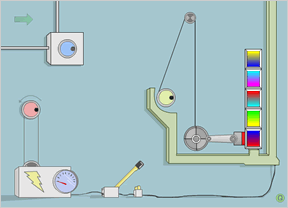
- Click the dark dot in each dial to rotate that dial, each dial moves something.
- Drag the lever at the bottom to connect/disconnect the circuit.
- The battery dial reads low. Circuits need power...
- The piston is an electro magnet.
- The gradient boxes look like they need to be put in a different order.

- First, circle the "hint" button in the upper right.
- There are four sets of shapes. These will flash. Note the order in which they flash.
- For example, when I did the puzzle, the left-most set of symbols flashed in this order: 3412. The topmost flashed in this order: 2341
- If you click on the bars with the symbols, the bars will move across the screen in a certain direction.
- In the empty grid, one of the squares is highlighted blue. You can move it around by dragging a line from where it is to an adjascent square. To solve:
- Start with the leftmost bar. Find the symbol that flashed first. Move the blue highlight cursor to the first square in that row. Draw that symbol that flashed first in that square.
- In my example, the 3rd row flashed first. The leftmost bar goes from left to right, so I drew that symbol into the first column of row 3.
- Find the symbol that flashed second. Move the blue cursor to the 2nd square in THAT row. Draw the symbol that flashed second in that square.
- Repeat until you have 4 symbols in the grid for the 4 symbols in the leftmost bar.
- NOTE: The rightmost bar travels right to left, so "1" in the rightmost bar means the last column, 2 means the next to last, etc. The same inverse logic goes for the bottom bar as compared to the top.

- Your goal is to make the big multi-color round travel, in a specific order, to intersect with each of the smaller colored circles.
- The first color you need to visit is indicated in the round.
- When you visit the first, you'll get the second.
- The columns on the left and right are for you to direct the round.
- Work from top to bottom inside the columns.
- You'll need to "paint" the columns with intermittent color. (A little red here, a little purple there.)
- The width of the line you paint inside the column, determines the angle of turn.
need some help on #10!! i did arrange the bottom pieces(the song plays correctly)..and matched the colours!!! what next? :)) i clicked on every arrow...nothing seems to work :(
Question about #14. I understand everything I have to do, but I don't understand

oh my gosh! can someone please help me on #6?!?

can anyone at all help me get past this one spot please???
ok wait, i think i figured this out:
is this right??
here it is:

i think this is right, but i'm not sure if it is... and also not sure if i'm able to do it! haha... also, if this is right, i hope it helps other people stuck on this level!
oops....never-mind
my dad figured it out!
but thanks anyway!
haha it took me:


17:53:58
haha i had it running all night though.... ;)

:D lol
I beat it!!!
3:55:53
Most of the time I was just sitting there thinking.
what about Click Drag Type 2??
lol noobs. beat it in 17.57 mins. just read those answers
it might help
In # 14 the board doesn't flash for me. I tried it in Firefox and in IE but nothing flashes when I hit the hint button...
Otherwise I played them all and I really enjoyed it! I look forward to more!
my time the 1st time was 5 hrs. 15 mins. the 2nd time was 15 mins. 50 sec.
On puzzle nine I slide the plunger on the right side up and down but the boxes won't move... what's the deal?
So just to check...no Click Drag Type 2?
The game we have up as Click Drag Type is actually the Click Drag Type 2.
However, each Click Drag Type game has included ALL of the puzzles from the previous versions, so all you really need to play all the puzzles in the Click Drag Type series is this one, Click Drag Type 3. =)
I can't get the game to even show up on the screen right; it's all overlapped and blank.
Screen shot, nony mouse? I have no idea how to help with just that little bit of information.
Thanks so much Eli Sherer, without your solution to number 9 I don't think I would have ever completed it! Id been trying for days! It gets really frustrating after a while, I understand completely how to do it, I just couldn't get the right solution! :P:P Thanks again.
For those struggling to get number fifteen done in time try turning earlier and quicker so that you grase the one you want to hit and are almost heading where you want to be instantly.
For number 13 I get all of the squares in the right order and nothing changes
ok when i do #14 nothing flashes. help
12 and 13 are good, but overall, the new installment seems a bit halfhearted. The first two installments were excellent, but I think the guy just ran out of good ideas for puzzles this time. Thankfully 12 and 13 almost made up for the nightmare that was 15.
Shave down the key so it lines up to either side??? What does that mean?
Great stuff!! Had a blast solving them (at work). Thanks!
I have a major problem with #13! Whenever I pick up a square with the crane the whole browser hangs and I need to crash it via the task manager. Tried on both IE and Firefox, crashes them both.
aaarrrrrggggggghhhhhh!!!!!!!!!! MINE WON'T EVEN LOAD!!!!!!

On #8, how do I turn the wood pieces so that they fit in the horizontal places?? I need help please!!!
Your job is to draw each of the 16 arrows on the sides into the grid. Draw on the top right icon and notice the way the arrows light up in, this is the clue for placing them.
So for example if in the first row, the arrow on the left lights up as number 3 in that column, it means it must be placed as number 3 counting from the left, and if the arrow on the right light up as number 4, it must be placed as number 4 counting from the right.
You draw the arrows with the pencil.spoiler
15:37 for CDT 3
omg will someone please send me a full screen shot of number 14 .. i really dont get what you mean in the walkthroughs .. please someone send me a picture please thanks .. my email adress is pinklady0904@hotmail.com .. please send it me please .. thanks xx
im stuck on level 8 i cut the wood but they wont stay between the boxes. am i doing something wrong????
come on guys 14m 36s first go. am i good or what? (don't answer that)
ok for 14, if it's skipping squares, make sure you have cookies enabled so it can save, then refresh and try again. this glich happens if you quit the puzzle without solving it, and it'll also let you draw lines anywhere. hope this helps ^_^
oh and BUMP!
The thing that bothers me about #15 is the incredible amount of time you spend TRYING to accomplish what you need to by the time you figure out how to accomplish it. It kind of defeats the purpose of the CDT series.
Help! CDT3 isn't loading! But it was earlier today...
Anyone?
[Edit: CDT3 is working for me. Are you sure you're still having trouble? -Jay]
Jay, Thanks for the speedy response. CDT3 back up & running, but now I can't get #8 to work. I have

and I can

but when I

they

What am I doing wrong?
Oh, BTW, I've gotten all the others and they work just fine.
Jayisgames is the best. I've spent far too much time on your site, and playing the games you review. I mean that in the best way. Thanks!
Okay, I don't know exactly what happened, but I closed the window and reloaded the page, and now it works fine and I was able to complete.
From the looks of other entries (and even a comment on the "behind the scenes") it seems that others have had similar problems with this one. Weird.
Apologies for the multiple postings.
Keep up the good work!
Thanks for your comments! ^_^
So busy today, so I hadn't had a chance yet to look into your issue, but I'm pleased that you figured it out anyways. :)
I'm not aware of any issues with #8. That was actually from CDT2.
But if it's all good now, that's all that matters! ;)
If you have trouble with Puzzle number 8, like I did for hours! Open the game up in Internet Explorer instead of Firefox. I could not get the last piece, and then when I went back to main menu it was still there to taunt me!!! But it worked fine with Explorer.
Comment Preview


Walkthrough Guide
Here is a walkthrough compiled from selected comments
Posted by: jay
|
April 5, 2007 1:54 AM