


New games|All games|Competitions|Suggest a game|Favorites|Help Squad|Chat|Prefs

By Psychotronic | add to favorites | add to your website | add to del.icio.us

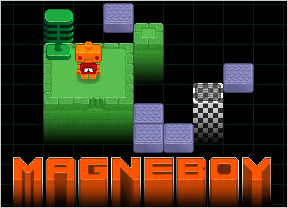
PsychotronicMagneboyIn the latest puzzle romp from Nitrome, you play the part of Magneboy, an orange robot powered by clockwork, with a dial in his chest set permanently to Neutral. He exists in a strange technological void, with pillars jutting out of the infinite blackness beneath. On each level, you must guide him to a checkerboard-patterned platform (robots are naturally attracted to early 60s diners). Then a vacuum tube will descend from the sky, suck him up, and deposit him in Robo-Valhalla, where he will spend the rest of his days surrounded by beautiful Magne-women and cybernetic roast pigs.

Nah, I'm kidding. He just gets to do another puzzle. Magneboy never escapes. He is doomed to eternal Sisyphean torment. Don't feel bad. He exists to entertain you.

Control Magneboy with the [arrow keys] or [WASD] and activate his Amazing Magnetic Powers with [space]. Magnetism works on the first thing in your robot's line of sight, and it has several uses. If you're looking at a blue platform across a chasm, Magneboy will be drawn forward to it. If you're looking at a gray suspended platform, it will come to Magneboy. Your powers don't work through obstacles, such as pretty flowers, which are of course the arch-nemesis of magnet people.

Analysis: Nitrome likes to make a pretty game. Although Magneboy's world doesn't require spectacular visuals, the Lego-inspired main character is nicely animated, and having the platforms peeking out of a techno void is a clever way to put the illusion of 3 dimensions onto a block-pushing (or pulling, rather) puzzle game. Add a downbeat, appropriately synthetic soundtrack, and you've got a typically high-quality Nitrome presentation.

It may be annoying at first to find how slowly Magneboy moves, but the quirky control is necessary to support the main scoring system. You get more points if you complete a level in fewer moves; but you can rotate to face different directions without it counting against you. So rather than constantly racking up useless steps, you need to hold down the arrow key for a moment after the robot turns before he starts walking. You get used to it. Most of the time, there's not a lot of area to cover.

Some of the puzzles feel a little sloppy, but most of them are nicely challenging without causing too much of a brain-ache. 50 levels await you in total, about 10 of which are well-spaced tutorials for various new elements in the game.

I would say that there are probably a few too many elements in Magneboy, in fact. Movable bridges and key platforms are fine, but the levels that feature moving attack robots were definitely my least favorite. The phlegmatic Magneboy is just not a robot made for tactical maneuvers. Realizing this, Nitrome has given you three lives per level, so the enemy robots are unlikely to even kill you, and they just seem pointless. I'd rather the whole action idea had been axed in favor of pure puzzling, but there aren't even that many action levels, so it's nearly a moot point.

Regardless, Nitrome is on a winning streak lately. This title provides a solid batch of block puzzles with an appealingly melancholy protagonist. Won't you take pity on poor Magneboy, and rescue him from the endless void? Play Magneboy.

The game is also available to play at the MTV Arcade.

  • Currently 4.3/5
  • 1
  • 2
  • 3
  • 4
  • 5
New! Rating: 4.3/5 (87 votes cast)

Magneboy walkthrough now available!

Walkthrough Guide

Complete Walkthrough:

image
*Any directions in a level that is starred has 'while avoiding monsters.' on the end of it.
________________________________________________________
Levels 1-10
image
  1. image
    Walk right until you are at the second question mark. Tap down, press Space. Turn left and move to the exit.
    Moves: 15
  2. image
    Tap up, press Space. Tap right, press Space. Tap down, press Space. Move right to the exit.
    Moves: 5
  3. image
    Tap right, press Space. Tap down, press Space four times. Tap right, press Space. Tap down, press Space. Tap right, press Space. Move to the exit.
    Moves: 9
  4. image
    Move up to edge. Tap right, press Space. Move down to edge. Tap left, press Space. Tap down, press Space. Tap left, press Space. Move left and up to the exit.
    Moves: 8
  5. image
    Move down to edge. Move right to edge. press Space. Move right one square. Move down one square. Tap right, press Space. Move down to edge. Tap left, press Space. Move left one square. Move down one square. Tap left, press Space. Move left one square. Move down two squares. Move left to exit.
    Moves: 18
  6. image
    Tap right, press Space. Move one square right, press Space (do this three times). Move one square right, tap down, press Space. Move one square down, press Space. Move one square down, tap right, press Space. Move one square right, press Space. Move on square right, tap down, press Space. Move one square down, press Space. Move one square down, tap right, press Space. Move one square right, press Space. Move on square right, tap down, press Space. Move down and right to the exit.
    Moves: 27
  7. image
    Tap right, press Space. Move one square right, press Space. Press Space. Tap left, press Space. Move one square up, tap right, press Space. tap down, press Space. Move down one square. Move left to the edge. Tap up, press Space. Move up one square. Move left to the edge. Move down one square. Move left to edge. Tap up, press Space. Move up and left to the exit.
    Moves: 21
  8. image
    Move down one square, tap right, press Space. Move up one square, tap right, press Space. Move up one square, tap right, press Space. Move to edge, press Space. Move right one square, tap up, press Space. Move up one square, press Space. Move up one square, press Space. Move up to exit.
    Moves: 18
  9. image
    Tap right, press Space. Tap up, press Space. Move one square up, tap left, press Space. Move one square left, tap up, press Space. Move one square up, press Space (do this four times, or until a bridge is created). Move up three spaces. Move right to exit.
    Moves: 18
  10. image
    Press Space. Move down one square, tap left, press Space. Move left one square, press Space (do this three times). Tap up, press Space. Move right to flower. Tap up, press Space. Move up one square, tap right, press Space. Move right one square, press Space (do this two times). Move right to edge. Move down to flower. Move right to flower. Tap up, press Space. Move up one square, tap right, press Space. Move right one square, press Space (do this two times). Move left one square. Move down to flower. Move right to edge. Tap down, press Space. Tap left, press Space. Move left one square, tap down, press Space. Move down one square, press Space (do this two times). Move down one square, tap left, press Space. Move up to exit.
    Moves: 48

________________________________________________________
Levels 11-20
image
  1. image
    Tap right, press Space. Move up to edge, tap left, press Space. Move down to edge. Move left one square, tap up, press Space. Move up one square, tap left, press Space. Tap right, press Space. Move right to exit.
    Moves: 16
  2. image
    Press Space. Tap right, press Space. Move down one square, tap left, press Space. Move up one square, press Space. Tap left, press Space. Tap down, press Space. Tap right, press Space. Tap down, press Space. Move right to edge. Move one square down, tap left, press Space. Move left and up to exit.
    Moves: 16
  3. image
    Move down seven squares, or until level with key block. Tap right, press Space. Move down to edge. Move right one square, tap up, press Space. Move right five squares, or until even with movable block. Tap up, press Space. Move up one square, tap left, press Space. Move down one square. Move right to edge. Move up to edge. Move left three squares, or until even with movable block. Tap down, press Space. Move left one square, tap down, press Space. Move left one square. Move down one square, tap right, press Space. Move right one square. Move down to exit.
    Moves: 54
  4. image
    Tap right, press Space. Move right to edge. Move up one square. Move right one square, tap down, press Space. Move down one square. Move right to exit.
    Moves: 13
  5. image
    Tap right, press Space. Tap up, press Space. Move left one square, tap down, press Space. Move right one square, tap down, press Space. Move down to edge, tap left, press Space. Tap up, press Space. Press Space. Move left one square. Move down one square, press Space. Move down and left to exit.
    Moves: 16
  6. image
    Press Space. Tap right, press Space. Move right to edge. Tap up, press Space. Tap down, press Space. Move down one square, tap left, press Space. Tap right, press Space. Move right one space. Move up to edge. Move right to edge. Move down to edge. Tap right, press Space. Move down one square, tap left, press Space. Move left one square, tap down, press Space. Tap up, press Space. Move up and right to exit.
    Moves: 28
  7. image
    Tap up, press Space. Move up to edge. Move right to edge. Move down two squares. Tap left, press Space. Move down to edge. Move left one square, tap up, press Space. Move up to edge. Move left to edge. Move down to edge. Tap right, press Space. Move up to edge. Move right to edge. Move down to edge. Move left one square, tap up, press Space. Move up one square. Move left four squares and up to exit.
    P.S. If anyone can do this level in sixty moves please tell me, because the first time I did this level, I could swear I got sixty moves, but all the other times I got sixty-two.
    Moves: 62
  8. image
    Tap right, press Space. Move right one square. Move up to edge. Move right one square, press Space. Move right one square. Move down to edge. Move right one square, press Space. Move right to exit.
    Moves: 32
  9. *
    image
    Move right to the question mark. Move up to exit, avoiding the monster.
    Moves: 15
  10. *
    image
    Move down one square. Move right ten squares. Tap down, press Space. Move one square down, press Space. Move one square down. Move one square right, tap down, press Space. Move one square down, press Space. Move right one square, tap down, press Space. Move down one square, press Space. Move down one square.Move right, and down to the exit.
    Moves: 27

________________________________________________________
Levels 21-30
image
  1. image
    Move down one square. Move right to edge. Move up one square. Move left one square. Move down to edge. Move right one square. Move up one square. Move left to edge. Move down one square. Move right to edge. Move up to exit.
    Moves: 13
  2. image
    Tap right, press Space. Move right to edge. Move down one square. Tap right, press Space. Move right one square. Move down to edge. Tap left, press Space. Move left one square, press Space (do this two times). Move left and up to exit.
    Moves: 14
  3. *
    image
    With getting hit once: Move up one square. Move right nine spaces, or to diagonal of Chase Bot. Move up five spaces and right to exit.
    Without getting hit: Lead Chase Bot into larger square. Dodge by going up or down, and move right and up to exit.
    Moves: 16-45
  4. *
    image
    Move down to edge. Move right to edge. Tap down, press Space. Move down to edge, tap right, press Space. Tap up, press Space. Move up one square. Move right to edge. Move down to edge. Tap right, press Space. Tap down, press Space. Move up one square. Move right to edge. Move down to edge. Press Space. Move down and left to exit.
    Moves: 30
  5. image
    Tap right, press Space. Move right one square, tap up, press Space. Move up to edge, press Space. Move up and left to exit.
    Moves: 8
  6. image
    Tap left, press Space. Move up one square, tap right, press Space. Move right to edge. Move up one square, tap right, press Space. Tap left press Space. Move left one square, tap down, press Space. Move down one square, press Space. Move down and right to exit.
    Moves: 14
  7. image
    Move up one square. Move right one square, tap up press Space. Move up one square. Move right one square, tap down, press Space. Move down one square, press Space. Move down one square, tap right, press Space. Move right one square, tap down, press Space. Move down and right to the exit.
    Moves: 14
  8. image
    Tap right, press Space. Move right to edge, press Space. Move right one square, press Space (do this three times). Move right one square, press Space. Tap down, press Space. Move right one square. Move up one square, tap right, press Space. Move down to edge. Move left one square, tap down, press Space. Move down one square, tap right, press Space. Move up to exit.
    Moves: 24
  9. *
    image
    (On this one I can only tell you what you have to do, not how to avoid the Chase Bots) Tap right, press Space. Tap down, press Space. Move down one square, tap left, press Space. Move up one square, tap left, press Space. Press Space. Tap up, press Space. Press Space. Move one space up, tap right, press Space. Move one space down, tap right, press Space. Move right four spaces, or until even with bridge block, tap down, press Space. Tap left, press Space. Press Space. Move one square down, tap right, press Space. Tap down, press Space. Press Space. Move two spaces over, tap up, press Space. Move up and right to exit.
    Moves: ??
  10. image
    Tap right, press Space. Move right one square, tap down, press Space. Move left to edge, tap down, press Space. Move down one space, tap right, press Space. Move up to edge. Move right one space, tap down, press Space. Move right two squares. Move down one square, tap left, press Space. Move left and down to exit.
    Moves: 20

________________________________________________________
Levels 31-40
image
  1. image
    Move right to edge. Move down to edge. Tap up, press Space. Move right to edge. Tap up, press Space. Move left and up to exit.
    Moves: 15
  2. image
    Tap right, press Space. Move left one square, tap down, press Space. Tap right, press Space. Tap up, press Space. Move up one square, press Space. Move down one square. Move right one square. Move down one square, tap left, press Space. Move left one square, tap up, press Space. Tap left, press Space. Move right one square, tap down, press Space. Move left one square, tap down, press Space. Tap right, press Space. Move up one square, press Space (do this two times). Move down one square. Move right one square. Move down one square, tap left, press Space. Move left one square, tap up, press Space. Tap left, press Space. Tap down, press Space. Tap right, press Space. Move up two squares, press Space. Move up one square. Move left one square, press Space. Tap up, press Space. Tap right, press Space. Move right to edge. Move down to edge, tap right, press Space. Move up one square, press Space. Move right one square. Move down to edge, tap left, press Space. Move left one square, tap up, press Space. Tap down, press Space. Move down one square, press Space. Move down one square. Move left and up to exit.
    Moves: 70
  3. image
    Press Space. Move one square down, tap right, press Space. Move one square right, press Space (do this 3 times). Move down one square, press Space. Move down one square, tap left, press Space. Move left one square, tap down, press Space. Move down one square, tap left, press Space. Move left one square, tap down, press Space. Move down one square, press Space (do this two times). Move down one square, tap left, press Space. Move one square left, press Space (do this three times). Move one square left, tap down, press Space. Tap up press Space. Move up one square. Move left to edge. Tap down, press Space. Move down and left to exit.
    Moves: 41
  4. *
    image
    Move left one square. Move up one square, press Space. Move left one square, tap up, press Space. Move right one square. Move down one square. Move right one square. Move down to edge. Move left to edge. Move down to edge. Move right to edge. Move up one square, tap left, press Space. Move left one square, press Space. Move left and up to exit.
    Moves: 30
  5. image
    Move right to edge, press Space. Move left one square, tap up, press Space. Move right two squares, tap up, press Space. Tap right, press Space (do this two times). Move right one square, tap up, press Space. Move up two squares, tap left, press Space. Move left one square, press Space. Move one square left. Move down two squares, tap left, press Space. Tap right, press Space. Move right to edge, press Space. Move right one square. Move up to edge, tap left, press Space. Move left one square. Move down two squares, tap left, press Space. Move right to edge, press Space. Move right one square, press Space. Move right to exit.
    Moves: 40
  6. image
    Tap right, press Space. Go right to edge, tap up, press Space. Tap down, press Space. Move down one square, tap right, press Space. Tap left, press Space. Move left one square, tap down, press Space. Tap up, press Space. Move up one square, tap right, press Space. Tap left, press Space. Move left one square, tap up, press Space. Tap down, press Space. Move down one square. Move left one square, press Space. Tap right, press Space. Go right to edge, press Space. Tap up, press Space. Tap down, press Space. Move down one square, tap right, press Space. Tap left, press Space. Move left one square, tap down, press Space. Tap up, press Space. Move up one square, tap right, press Space. Tap left, press Space. Move left one square, tap up, press Space. Tap down, press Space. Move down and right to exit.
    Moves: 40
  7. image
    Move right one square. Move down one square, tap right, press Space. Move left to edge, press Space. Move up one square. Move right one square. Move down to edge. Move left one square. Move up one square, tap left, press Space. Move left one square, tap up, press Space. Move right to edge, press Space. Move right one square, tap up, press Space. Move up one square, tap left, press Space. Move down one square. Move left five squares. Move up one square. Move right to exit.
    Moves: 25
  8. image
    Move right to edge, tap down, press Space. Move left to edge. Move down two squares. Move right one square, tap down, press Space. Move left one square. Move down to edge. Move right one square, tap up, press Space. Move up one square, tap right, press Space. Move left one square. Move up to edge. Move right to edge. Move down one square, press Space. Move down one square. Move right to exit.
    Moves: 30
  9. image
    Tap left, press Space. Tap up, press Space. Move left one square, tap up, press Space. Move up one square, tap right, press Space. Move right one square, tap down, press Space. Move left to edge, press Space. Move right to edge. Move down one square, tap left, press Space. Tap up, press Space. Move left one square, tap up, press Space. Move up one square, tap right, press Space. Move right one square, tap down, press Space. Move left to edge, press Space. Move left one square, tap up, press Space. Move up and left to exit.
    Moves: 30
  10. image
    Move right two squares, press Space. Move left to edge, tap down, press Space. Tap left, press Space. Move down to edge, tap right, press Space. Tap up, press Space. Move left to edge. Move up one square, tap right, press Space. Move up to edge, tap right, press Space. Tap down, press Space. Move left to edge. Move down one square, tap right, press Space. Move right one square, tap down, press Space. Move down one space. Move left to edge, press Space. Move left and up to exit.
    Moves: 32

________________________________________________________
Levels 41-50
image
  1. *
    image
    Tap right, press Space. Press Space. Tap down, press Space. Tap left, Press Space. Tap down, press Space. Move down to edge. Here you have to lure the Chase Bot to the left 'island' across the bridge. You may get less or more moves than I did at this point. Just make sure to get out of there by zooming to the magnet block on the right island. Move left one square. Move up one square, press Space. Move up one square, tap left, press Space. Move left one square, tap up, press Space. Move up one square, tap left press Space. Move left and up to exit.
    Moves: 27
  2. *
    image
    Tap left, press Space. Move left one square. Move up one square, press Space. Move up one square, tap left, press Space. Move one square down. Move one square right, tap up, press Space. Move left one square. Move down one square, tap left, press Space. Move left one square, tap down, press Space. Move down one square, press Space. Move down and left to exit.
    Moves: 18
  3. *
    image
    Press Space. Move down one square, press Space. Move down one square. Move left to edge, press Space. Move left one square, press Space. Move left one square. Move up to edge, press Space. Tap left, press Space. Move left one square. Move up one square, tap right, press Space. Move right one square, press Space (do this six times). Move right to exit.
    Moves: 38
  4. image
    Move right two squares, tap down, press Space. Move left one square, tap down, press Space. Move right one square, tap down, press Space. Move left to edge, tap down, press Space. Tap up, press Space. Tap right, press Space. Tap up, press Space. Move up one square. Tap right, press Space. Tap left, press Space. Move left and up to exit, tap left, press Space.
    Moves: 22
  5. image
    Press Space. Move right one square, press Space. Move right one square. Move up one square, tap left, press Space. Tap right, press Space. Move right one space, tap up, press Space. Tap down press Space. Move right one Square, tap down, press Space. Move down one square, tap right, press Space. Move right one square, press Space. Move right and up to exit.
    Moves: 18
  6. image
    Tap right, press Space. Move down three squares, tap right, press Space. Move down to edge, tap right, press Space. Move right one square, press Space. Move left one square. Move up three squares, tap right, press Space. Move down one square, tap right, press Space. Move down two squares. Move right to edge. Move up and right to exit.
    Moves: 28
  7. image
    Tap up, press Space. Move right two squares, tap down, press Space. Tap left, press Space. Tap down, press Space. Tap right, press Space. Move right to edge, press Space. Tap left, press Space. Tap up, press Space. Move right three squares, tap down, press Space. Move right to edge. Move down one square, tap left, press Space. Move left one square, press Space. Move up one square, tap left, press Space. Move right two squares, tap down, press Space. Move right seven squares. Move down one square, tap left, press Space. Move up one square, tap left, press Space. Tap down, press Space. Press Space. Move right nine spaces, tap up, press Space. Tap left, press Space. Tap up, press Space. Press Space. Move right eight squares. Move down to edge. Move right one square. Move down one square. Move right to exit.
    Moves: 75
  8. *
    image
    Move right to edge. Move down one square, tap left, press Space. Move left one square, tap down, press Space. Move down one square, tap left press Space. Move up two squares. Move left nine squares. Move down to edge, press Space. Move up to edge. Move right nine squares. Move down to edge, tap right, press Space. Move right and down to exit.
    Moves: 22
  9. image
    Tap right, press Space. Move right one square, tap down, press Space. Tap right, press Space. Tap left, press Space. Move left one square, tap down, press Space. Move right one square, tap down, press Space. Tap left, press Space. Tap up, press Space. Move left one square. Move down one square, press Space. Move up one square. Move right one square, tap down, press Space. Tap left, press Space. Tap down, press Space. Tap right, press Space. Tap up, press Space. Move right one square. Move up to edge. Tap down, press Space. Move down one square. Move right and down to exit.
    Moves: 36
  10. image
    Move down to edge, tap right, press Space. Move up to edge. Move right one square, tap down, press Space. Move right one square, press Space. Move left to edge. Move down to edge. Move right one square, tap up, press Space. Move right one square, tap up, press Space. Move right to edge. Move up one square, tap left, press Space. Move up to edge. Move left one square, tap down, press Space. Move right one square. Move down four squares, tap left, press Space. Move up three squares. Move left one square, tap down, press Space. Move down and left to exit.
    Moves: 54

Comments (may contain spoilers)

Ah, power of posting. Sorted. 35 no longer a problem.

I'm bored now. I STILL can't do Lvl 29! PLEEEASE! Can anyone guide me through it? I know what you have to do, I just can't do it!

Help with 7 please

Never Mind! I finally did it. It only took the best part of half an hour...

Every Nitrome game is always head and shoulders above everyday games, and Magneboy is no exception.

However... I'm not a fan of games with a puzzle element. They are meh. I prefer their usual style (2D platformer action).

Still, I like it. I look forward to their next game (Skywire 2 in a month or so :))

I NEED HELP for level 30..... I'm stuck.

any hints on 32??? plz

I AM STUCK ON LEVEL 49!
HELP ME!
PLEASE!

Now, I need help with 41. Common! Somebody!

make it like the following if you want to get through level 49
http://img20.imageshack.us/my.php?image=megneboylevel49br7.jpg

O.k. now im stuc on 43.

help me on level 28 please!

I'm stuck on 16. Darn.

Ah, never mind. I'm an idiot. I actually had it figured out the entire time. Huh.

For help with lvl 16

image
go down, [space], right 2x, [space]. right, up, [space], down, [space], down, [space], left, [space], right, [space], right, move along the green until you come to the other end, right, [space], down, left, [space], left, down, [space], up, [space], and now you should be able to get out.

I REAAAALLY need help on level 32. PLEASE!!!

thanks Toby!!!

I'd like to second/third the request for help with lv32. Please!

Just finished lv32.

* First, move the three grey platforms on the left so they are in a vertical line on the left of the group of three flowers. You can now get to the right of the three flowers.
* Move the other grey platform left and down, then right and up.
* Pull the purple bridge tile up, creating a bridge to the exit.

Can someone give me a way to beat 47 beside toby because I didnt get his expination.

I Dont Get 47 Still! HELP!!!!

i really need help lvl 26 please

47:

image
get rid of the first and the third monster hit restart get rid of them than walk through the middle one

34


34


34

help 3444444444

Ack.!!
I can't get past Lvl. 10

I pulled only 2 stacks of the purple platforms, but then I'm lost.
could someone write a walkthrough for Lvl 10?

I don't get your explaination for level 47

Please help on 34!!!

I may be stupid but I cannot get past level 31. Help, anyone?

level 28 please

So obviously as soon as I posted I figured it out. I'm hoping it'll happen again now, but just in case it doesn't, I could use some help on 40?

Coming back to this game after a night's sleep, I'm stil bamboozled by level 33!

Can anyone help please?

Post, faff about and solved!

So embarrassing!

help level 48\
please help me!!!!!!!!!!!!

For those stuck in Level 47, here's a picture of the solution:

http://img148.imageshack.us/img148/626/magneboyyg7.png

Level 17 anyone?

i need help on level 31 please!!!

I know animekill already posted a solution for 49, but my computer won't let me see imageshack so I would appreciate it if someone would post a walkthrough/some hints. Thanks in advance!

For 47:

image
* First, unseat the three robots and pull the three platforms so they are in a horizontal line in the top-right corner of the main rectangle. *Go to the bottom of the rectangle and pull the middle platform down.

i'm totally stuck on 36, and only posting this in the hopes that the magic will help me. or some kind person, of course. :-)

that being said, i can help with 34... there seem to be some desperate pleas.

image
first of all, always go in the same direction as the robots. go to the top right corner, face left, and pull the first block towards you. stand on it and pull the second block towards you. then go down and around -- following the robots! -- to the bottom left corner, under the portal, not beside it. pull the first block through the portal. go to the bottom right corner, face left, and pull the block towards you. then go back up to the top right and pull the second block into the corner above the portal. go back down to the bottom left, pull the block through. go stand on the block in the bottom right corner, pull the other block through, and walk onto the exit! yay!

thank you, posting magic! i am now qualified to help with level 36, if anyone else is zipping around purposelessly.

Nitrome is releasing new game every day :)
Planning to review Cheese Dreams?

Level 49:

image
first go to the highest violett, move the brick under it to you, then go to the blue one on the right and move the levt violett to you. After that step on it and move violet on the right up to you. The last steps are to move the last two violetts up to the others and viola you have a bridge of to lines you can step on!

"Cheese Dreams" is a nice little game, but so far it is not on a par with the Nitrome games reviewed in the last couple of weeks. The graphics look a bit different, too... maybe it is the broad black outline of the main character sprite. Or is it - have they gone from pixel art to vector art?

Please save your comments about Cheese Dreams, we'll have a post up about it soon.

Help on level 27 PLEASE!!!!!!!

Can anyone give me a hint for level 42?

I don't get level 9

Can't get level 31 please help

help on 31 please.

Need help on 32... been stuck there FOREVER!
walkthrough would be much appreciated...

can someone please help me on lvl 28

finished lvl 28 now can someone help me with lvl 29

help on lv 6 PLEASE!!

please help with 11!

Could I have some help on 33 please? (Thanks for the help on Level 32).

Can someone please help on level31!!!!

Level 39, please...

Help on 26 please!!!

Wow, I feel dumb...
Can anyone help me with level 18?

Sorry, never mind, I just figured it out...
That was simple... o.o

Can someone please help me with level 28?

I need help on level 35! Please!

Level 26 help:

image
Turn left and hit space, this will pull the key box next to the exit. Walk to the top, right of the square you are standing on, facing right. Pull the purple box to you. Step out onto it, and then to the one above it. Turn right and face the blue box, hit space moving over to it. Turn around and pull the purple box you just left to you. Walk out on it and turn facing the red box. Pull the red [key] box to you, step onto it. Pull the purple box below you, to you. Walk onto the purple box, turn left and walk onto the exit.

I hoped that helped

Ah-gain:
Does anyone get Level 17?
I feel really dumb for asking.
But still.
Does anyone?

I found a glitch on level 47. When you start the level, just turn to the right and shoot your beam. It doesn't do anything, but now you can walk right across the first monster.

Sorry for the double post, but I just figured out that you can do that for all of the monsters on level 47 and finish it in like 15 moves. I hope they solve that.

I am so stuck on 44 I tried the hint but I still can't get it. Can someone help me please b, have been on it for over an hour

31
3131
313131
31313131
3131313131
313131313131
3131313131
31313131
313131
3131
31

HEEELLLLPPP!!! 31!!!

please help me with 28

28

28


28
28

ill be your friend

i got past lvl 28 now lvl 31 please i need help.

ill be your friend

Could someone please help with level 48 ???

please please PLEASE help with 44! having many issues.

please please please help on level 28. i no its probly insanly easy and im just insanly stupid but pleeeeaaasssse help.

Best friends forever for Level 17 help! (traces rainbow of friends in air)

Aha. Nevermind about that.

17 17
17


17 17
17 17
17 17
plz sum1 help me with lvl 17 i cannot do it! PLZ HELP ME PLZZZZZZZZZZZZZZZZZZZZZZZZZZZZ

just so you know, I'm working on a complete walkthrough for all you people that are stuck on a level. It will tell you exactly what to do, so there's no confusion.

help on lv 32
walkthrough would be GGRREEAATT

Please, Please, I've been stuck for three days now on level 48. Can anyone please give me a hint, at least...

30 plz!

OK, so I'm stuck on 31 now as well. C'mon, surely SOMEONE must be able to guide us through it? Help? Anyone? PLEASE?

Didn't you see my above post? I'm making a complete walkthrough! Help is on the way! (I should be done about twenty minutes after I post this).

33!!!!!!!!
full walkthrough!

My experience with the moving attack robots is this: If you're trying to outrun them, you probably have missed a more elegant solution to the level. I hated them, but now I enjoy them.

The purple bridge tiles, not so much. Grrrr.

doris006 I can help you with level 17.

image
First you pull the first block.Then you see a brige.You have to go through the brige.Next keep going east then go north.After press spacebar and go on the purple tile with the question mark but do not read what it says.After that press spacebar.Then go to the second block and press spacebar but do not go through the brige.Finally go through any brige you see.

Complete Walkthrough:

image
*Any directions in a level that is starred has 'while avoiding monsters.' on the end of it.
________________________________________________________
Levels 1-10
image
  1. image
    Walk right until you are at the second question mark. Tap down, press Space. Turn left and move to the exit.
    Moves: 15
  2. image
    Tap up, press Space. Tap right, press Space. Tap down, press Space. Move right to the exit.
    Moves: 5
  3. image
    Tap right, press Space. Tap down, press Space four times. Tap right, press Space. Tap down, press Space. Tap right, press Space. Move to the exit.
    Moves: 9
  4. image
    Move up to edge. Tap right, press Space. Move down to edge. Tap left, press Space. Tap down, press Space. Tap left, press Space. Move left and up to the exit.
    Moves: 8
  5. image
    Move down to edge. Move right to edge. press Space. Move right one square. Move down one square. Tap right, press Space. Move down to edge. Tap left, press Space. Move left one square. Move down one square. Tap left, press Space. Move left one square. Move down two squares. Move left to exit.
    Moves: 18
  6. image
    Tap right, press Space. Move one square right, press Space (do this three times). Move one square right, tap down, press Space. Move one square down, press Space. Move one square down, tap right, press Space. Move one square right, press Space. Move on square right, tap down, press Space. Move one square down, press Space. Move one square down, tap right, press Space. Move one square right, press Space. Move on square right, tap down, press Space. Move down and right to the exit.
    Moves: 27
  7. image
    Tap right, press Space. Move one square right, press Space. Press Space. Tap left, press Space. Move one square up, tap right, press Space. tap down, press Space. Move down one square. Move left to the edge. Tap up, press Space. Move up one square. Move left to the edge. Move down one square. Move left to edge. Tap up, press Space. Move up and left to the exit.
    Moves: 21
  8. image
    Move down one square, tap right, press Space. Move up one square, tap right, press Space. Move up one square, tap right, press Space. Move to edge, press Space. Move right one square, tap up, press Space. Move up one square, press Space. Move up one square, press Space. Move up to exit.
    Moves: 18
  9. image
    Tap right, press Space. Tap up, press Space. Move one square up, tap left, press Space. Move one square left, tap up, press Space. Move one square up, press Space (do this four times, or until a bridge is created). Move up three spaces. Move right to exit.
    Moves: 18
  10. image
    Press Space. Move down one square, tap left, press Space. Move left one square, press Space (do this three times). Tap up, press Space. Move right to flower. Tap up, press Space. Move up one square, tap right, press Space. Move right one square, press Space (do this two times). Move right to edge. Move down to flower. Move right to flower. Tap up, press Space. Move up one square, tap right, press Space. Move right one square, press Space (do this two times). Move left one square. Move down to flower. Move right to edge. Tap down, press Space. Tap left, press Space. Move left one square, tap down, press Space. Move down one square, press Space (do this two times). Move down one square, tap left, press Space. Move up to exit.
    Moves: 48

________________________________________________________
Levels 11-20
image
  1. image
    Tap right, press Space. Move up to edge, tap left, press Space. Move down to edge. Move left one square, tap up, press Space. Move up one square, tap left, press Space. Tap right, press Space. Move right to exit.
    Moves: 16
  2. image
    Press Space. Tap right, press Space. Move down one square, tap left, press Space. Move up one square, press Space. Tap left, press Space. Tap down, press Space. Tap right, press Space. Tap down, press Space. Move right to edge. Move one square down, tap left, press Space. Move left and up to exit.
    Moves: 16
  3. image
    Move down seven squares, or until level with key block. Tap right, press Space. Move down to edge. Move right one square, tap up, press Space. Move right five squares, or until even with movable block. Tap up, press Space. Move up one square, tap left, press Space. Move down one square. Move right to edge. Move up to edge. Move left three squares, or until even with movable block. Tap down, press Space. Move left one square, tap down, press Space. Move left one square. Move down one square, tap right, press Space. Move right one square. Move down to exit.
    Moves: 54
  4. image
    Tap right, press Space. Move right to edge. Move up one square. Move right one square, tap down, press Space. Move down one square. Move right to exit.
    Moves: 13
  5. image
    Tap right, press Space. Tap up, press Space. Move left one square, tap down, press Space. Move right one square, tap down, press Space. Move down to edge, tap left, press Space. Tap up, press Space. Press Space. Move left one square. Move down one square, press Space. Move down and left to exit.
    Moves: 16
  6. image
    Press Space. Tap right, press Space. Move right to edge. Tap up, press Space. Tap down, press Space. Move down one square, tap left, press Space. Tap right, press Space. Move right one space. Move up to edge. Move right to edge. Move down to edge. Tap right, press Space. Move down one square, tap left, press Space. Move left one square, tap down, press Space. Tap up, press Space. Move up and right to exit.
    Moves: 28
  7. image
    Tap up, press Space. Move up to edge. Move right to edge. Move down two squares. Tap left, press Space. Move down to edge. Move left one square, tap up, press Space. Move up to edge. Move left to edge. Move down to edge. Tap right, press Space. Move up to edge. Move right to edge. Move down to edge. Move left one square, tap up, press Space. Move up one square. Move left four squares and up to exit.
    P.S. If anyone can do this level in sixty moves please tell me, because the first time I did this level, I could swear I got sixty moves, but all the other times I got sixty-two.
    Moves: 62
  8. image
    Tap right, press Space. Move right one square. Move up to edge. Move right one square, press Space. Move right one square. Move down to edge. Move right one square, press Space. Move right to exit.
    Moves: 32
  9. *
    image
    Move right to the question mark. Move up to exit, avoiding the monster.
    Moves: 15
  10. *
    image
    Move down one square. Move right ten squares. Tap down, press Space. Move one square down, press Space. Move one square down. Move one square right, tap down, press Space. Move one square down, press Space. Move right one square, tap down, press Space. Move down one square, press Space. Move down one square.Move right, and down to the exit.
    Moves: 27

________________________________________________________
Levels 21-30
image
  1. image
    Move down one square. Move right to edge. Move up one square. Move left one square. Move down to edge. Move right one square. Move up one square. Move left to edge. Move down one square. Move right to edge. Move up to exit.
    Moves: 13
  2. image
    Tap right, press Space. Move right to edge. Move down one square. Tap right, press Space. Move right one square. Move down to edge. Tap left, press Space. Move left one square, press Space (do this two times). Move left and up to exit.
    Moves: 14
  3. *
    image
    With getting hit once: Move up one square. Move right nine spaces, or to diagonal of Chase Bot. Move up five spaces and right to exit.
    Without getting hit: Lead Chase Bot into larger square. Dodge by going up or down, and move right and up to exit.
    Moves: 16-45
  4. *
    image
    Move down to edge. Move right to edge. Tap down, press Space. Move down to edge, tap right, press Space. Tap up, press Space. Move up one square. Move right to edge. Move down to edge. Tap right, press Space. Tap down, press Space. Move up one square. Move right to edge. Move down to edge. Press Space. Move down and left to exit.
    Moves: 30
  5. image
    Tap right, press Space. Move right one square, tap up, press Space. Move up to edge, press Space. Move up and left to exit.
    Moves: 8
  6. image
    Tap left, press Space. Move up one square, tap right, press Space. Move right to edge. Move up one square, tap right, press Space. Tap left press Space. Move left one square, tap down, press Space. Move down one square, press Space. Move down and right to exit.
    Moves: 14
  7. image
    Move up one square. Move right one square, tap up press Space. Move up one square. Move right one square, tap down, press Space. Move down one square, press Space. Move down one square, tap right, press Space. Move right one square, tap down, press Space. Move down and right to the exit.
    Moves: 14
  8. image
    Tap right, press Space. Move right to edge, press Space. Move right one square, press Space (do this three times). Move right one square, press Space. Tap down, press Space. Move right one square. Move up one square, tap right, press Space. Move down to edge. Move left one square, tap down, press Space. Move down one square, tap right, press Space. Move up to exit.
    Moves: 24
  9. *
    image
    (On this one I can only tell you what you have to do, not how to avoid the Chase Bots) Tap right, press Space. Tap down, press Space. Move down one square, tap left, press Space. Move up one square, tap left, press Space. Press Space. Tap up, press Space. Press Space. Move one space up, tap right, press Space. Move one space down, tap right, press Space. Move right four spaces, or until even with bridge block, tap down, press Space. Tap left, press Space. Press Space. Move one square down, tap right, press Space. Tap down, press Space. Press Space. Move two spaces over, tap up, press Space. Move up and right to exit.
    Moves: ??
  10. image
    Tap right, press Space. Move right one square, tap down, press Space. Move left to edge, tap down, press Space. Move down one space, tap right, press Space. Move up to edge. Move right one space, tap down, press Space. Move right two squares. Move down one square, tap left, press Space. Move left and down to exit.
    Moves: 20

________________________________________________________
Levels 31-40
image
  1. image
    Move right to edge. Move down to edge. Tap up, press Space. Move right to edge. Tap up, press Space. Move left and up to exit.
    Moves: 15
  2. image
    Tap right, press Space. Move left one square, tap down, press Space. Tap right, press Space. Tap up, press Space. Move up one square, press Space. Move down one square. Move right one square. Move down one square, tap left, press Space. Move left one square, tap up, press Space. Tap left, press Space. Move right one square, tap down, press Space. Move left one square, tap down, press Space. Tap right, press Space. Move up one square, press Space (do this two times). Move down one square. Move right one square. Move down one square, tap left, press Space. Move left one square, tap up, press Space. Tap left, press Space. Tap down, press Space. Tap right, press Space. Move up two squares, press Space. Move up one square. Move left one square, press Space. Tap up, press Space. Tap right, press Space. Move right to edge. Move down to edge, tap right, press Space. Move up one square, press Space. Move right one square. Move down to edge, tap left, press Space. Move left one square, tap up, press Space. Tap down, press Space. Move down one square, press Space. Move down one square. Move left and up to exit.
    Moves: 70
  3. image
    Press Space. Move one square down, tap right, press Space. Move one square right, press Space (do this 3 times). Move down one square, press Space. Move down one square, tap left, press Space. Move left one square, tap down, press Space. Move down one square, tap left, press Space. Move left one square, tap down, press Space. Move down one square, press Space (do this two times). Move down one square, tap left, press Space. Move one square left, press Space (do this three times). Move one square left, tap down, press Space. Tap up press Space. Move up one square. Move left to edge. Tap down, press Space. Move down and left to exit.
    Moves: 41
  4. *
    image
    Move left one square. Move up one square, press Space. Move left one square, tap up, press Space. Move right one square. Move down one square. Move right one square. Move down to edge. Move left to edge. Move down to edge. Move right to edge. Move up one square, tap left, press Space. Move left one square, press Space. Move left and up to exit.
    Moves: 30
  5. image
    Move right to edge, press Space. Move left one square, tap up, press Space. Move right two squares, tap up, press Space. Tap right, press Space (do this two times). Move right one square, tap up, press Space. Move up two squares, tap left, press Space. Move left one square, press Space. Move one square left. Move down two squares, tap left, press Space. Tap right, press Space. Move right to edge, press Space. Move right one square. Move up to edge, tap left, press Space. Move left one square. Move down two squares, tap left, press Space. Move right to edge, press Space. Move right one square, press Space. Move right to exit.
    Moves: 40
  6. image
    Tap right, press Space. Go right to edge, tap up, press Space. Tap down, press Space. Move down one square, tap right, press Space. Tap left, press Space. Move left one square, tap down, press Space. Tap up, press Space. Move up one square, tap right, press Space. Tap left, press Space. Move left one square, tap up, press Space. Tap down, press Space. Move down one square. Move left one square, press Space. Tap right, press Space. Go right to edge, press Space. Tap up, press Space. Tap down, press Space. Move down one square, tap right, press Space. Tap left, press Space. Move left one square, tap down, press Space. Tap up, press Space. Move up one square, tap right, press Space. Tap left, press Space. Move left one square, tap up, press Space. Tap down, press Space. Move down and right to exit.
    Moves: 40
  7. image
    Move right one square. Move down one square, tap right, press Space. Move left to edge, press Space. Move up one square. Move right one square. Move down to edge. Move left one square. Move up one square, tap left, press Space. Move left one square, tap up, press Space. Move right to edge, press Space. Move right one square, tap up, press Space. Move up one square, tap left, press Space. Move down one square. Move left five squares. Move up one square. Move right to exit.
    Moves: 25
  8. image
    Move right to edge, tap down, press Space. Move left to edge. Move down two squares. Move right one square, tap down, press Space. Move left one square. Move down to edge. Move right one square, tap up, press Space. Move up one square, tap right, press Space. Move left one square. Move up to edge. Move right to edge. Move down one square, press Space. Move down one square. Move right to exit.
    Moves: 30
  9. image
    Tap left, press Space. Tap up, press Space. Move left one square, tap up, press Space. Move up one square, tap right, press Space. Move right one square, tap down, press Space. Move left to edge, press Space. Move right to edge. Move down one square, tap left, press Space. Tap up, press Space. Move left one square, tap up, press Space. Move up one square, tap right, press Space. Move right one square, tap down, press Space. Move left to edge, press Space. Move left one square, tap up, press Space. Move up and left to exit.
    Moves: 30
  10. image
    Move right two squares, press Space. Move left to edge, tap down, press Space. Tap left, press Space. Move down to edge, tap right, press Space. Tap up, press Space. Move left to edge. Move up one square, tap right, press Space. Move up to edge, tap right, press Space. Tap down, press Space. Move left to edge. Move down one square, tap right, press Space. Move right one square, tap down, press Space. Move down one space. Move left to edge, press Space. Move left and up to exit.
    Moves: 32

________________________________________________________
Levels 41-50
image
  1. *
    image
    Tap right, press Space. Press Space. Tap down, press Space. Tap left, Press Space. Tap down, press Space. Move down to edge. Here you have to lure the Chase Bot to the left 'island' across the bridge. You may get less or more moves than I did at this point. Just make sure to get out of there by zooming to the magnet block on the right island. Move left one square. Move up one square, press Space. Move up one square, tap left, press Space. Move left one square, tap up, press Space. Move up one square, tap left press Space. Move left and up to exit.
    Moves: 27
  2. *
    image
    Tap left, press Space. Move left one square. Move up one square, press Space. Move up one square, tap left, press Space. Move one square down. Move one square right, tap up, press Space. Move left one square. Move down one square, tap left, press Space. Move left one square, tap down, press Space. Move down one square, press Space. Move down and left to exit.
    Moves: 18
  3. *
    image
    Press Space. Move down one square, press Space. Move down one square. Move left to edge, press Space. Move left one square, press Space. Move left one square. Move up to edge, press Space. Tap left, press Space. Move left one square. Move up one square, tap right, press Space. Move right one square, press Space (do this six times). Move right to exit.
    Moves: 38
  4. image
    Move right two squares, tap down, press Space. Move left one square, tap down, press Space. Move right one square, tap down, press Space. Move left to edge, tap down, press Space. Tap up, press Space. Tap right, press Space. Tap up, press Space. Move up one square. Tap right, press Space. Tap left, press Space. Move left and up to exit, tap left, press Space.
    Moves: 22
  5. image
    Press Space. Move right one square, press Space. Move right one square. Move up one square, tap left, press Space. Tap right, press Space. Move right one space, tap up, press Space. Tap down press Space. Move right one Square, tap down, press Space. Move down one square, tap right, press Space. Move right one square, press Space. Move right and up to exit.
    Moves: 18
  6. image
    Tap right, press Space. Move down three squares, tap right, press Space. Move down to edge, tap right, press Space. Move right one square, press Space. Move left one square. Move up three squares, tap right, press Space. Move down one square, tap right, press Space. Move down two squares. Move right to edge. Move up and right to exit.
    Moves: 28
  7. image
    Tap up, press Space. Move right two squares, tap down, press Space. Tap left, press Space. Tap down, press Space. Tap right, press Space. Move right to edge, press Space. Tap left, press Space. Tap up, press Space. Move right three squares, tap down, press Space. Move right to edge. Move down one square, tap left, press Space. Move left one square, press Space. Move up one square, tap left, press Space. Move right two squares, tap down, press Space. Move right seven squares. Move down one square, tap left, press Space. Move up one square, tap left, press Space. Tap down, press Space. Press Space. Move right nine spaces, tap up, press Space. Tap left, press Space. Tap up, press Space. Press Space. Move right eight squares. Move down to edge. Move right one square. Move down one square. Move right to exit.
    Moves: 75
  8. *
    image
    Move right to edge. Move down one square, tap left, press Space. Move left one square, tap down, press Space. Move down one square, tap left press Space. Move up two squares. Move left nine squares. Move down to edge, press Space. Move up to edge. Move right nine squares. Move down to edge, tap right, press Space. Move right and down to exit.
    Moves: 22
  9. image
    Tap right, press Space. Move right one square, tap down, press Space. Tap right, press Space. Tap left, press Space. Move left one square, tap down, press Space. Move right one square, tap down, press Space. Tap left, press Space. Tap up, press Space. Move left one square. Move down one square, press Space. Move up one square. Move right one square, tap down, press Space. Tap left, press Space. Tap down, press Space. Tap right, press Space. Tap up, press Space. Move right one square. Move up to edge. Tap down, press Space. Move down one square. Move right and down to exit.
    Moves: 36
  10. image
    Move down to edge, tap right, press Space. Move up to edge. Move right one square, tap down, press Space. Move right one square, press Space. Move left to edge. Move down to edge. Move right one square, tap up, press Space. Move right one square, tap up, press Space. Move right to edge. Move up one square, tap left, press Space. Move up to edge. Move left one square, tap down, press Space. Move right one square. Move down four squares, tap left, press Space. Move up three squares. Move left one square, tap down, press Space. Move down and left to exit.
    Moves: 54

Can you post walkthrough that actually describes what your doing instead of just moves? It's confusing.

OH my gosh, FlyingHigh, you are a LIFESAVER. THANK THANK THANK THANK THANK YOU!!!!!

...Though, it would be helpful to go like Level 1, 2, 3, 4, 5, 6, 7, 8, 9, 10, 11 instead of only going up to 10 and then starting again.

I fixed the numbering in the walkthrough. That was my doing to begin with. Thanks for pointing it out. :)

FlyingHigh, you rule! :D FINALLY I got out of level 32! Thanks a million!

A complaint. Reaching for the mouse to select the next level while everything else is done with the keyboard is frustrating and distracting.

@ Dylan: Do you have any idea how long it must have taken to compile this kind of walkthrough? What you're asking for would take forever... much longer than it will take most people to complete the game on their own.

@Flying High: Bug fixed. The monster was supposed to reactivate the unwalkable state of the tile if the tile didn't move.

@Taybo: You need to read the end of level panel more carefully. It tells you that you can press "space" to continue to the next level. Same as when you die. (It also responds to "r", because this is a knee-jerk reaction to dying.) All of the more recent Nitrome games that are keyboard controlled have this setup. Trying to debug a keyboard driven game and reaching for the mouse all the time can drive you mad.

@Flying High: Nice walkthrough, but a very complicated way of doing 17 there. I can do it in about 32 moves.

image
Don't move the tile by the finish tile. Just bunch the other bridge tiles up on that L-shape to make a path straight to it.

Thank you so much FlyingHigh!!! =)

@st33d: I can't guarantee that every single level has the smallest n

