





 Hidden Expedition: Titanic, by Big Fish Games, is a seemingly simple game of finding objects in a picture. The pictures have a mostly antique, nautical theme, and you need to find all of the objects on your list before your oxygen runs out. As you progress through the levels, the number of rooms you need to explore within the time frame increases.
 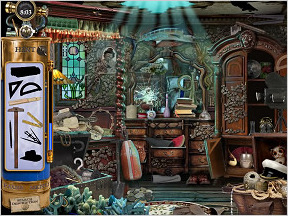 If you're really stuck, you can press the Hint button, but at the price of losing some of your oxygen. You can boost the oxygen if you click on an oxygen tank hidden in the picture, but of course that depends on there being an oxygen tank available...
Whenever you pass a level, you're shown some trivia about the Titanic. Did you know that the price of a single first-class ticket cost the equivalent of $50,000 today? In addition, there are bonus puzzles between levels. You've won the game when you successfully crack the code to the King's safe and find the crown.
Analysis: This visually gorgeous game is much harder than I've made it sound. For a start, its antique theme makes it quite challenging to find things like a "hydrant" or a "telephone". (The antique theme isn't necessarily consistent—one of the "guitars" is a perfectly modern-looking Les Paul.) There are several pictures for each description, so if you've found a "snake" in one room, you can't assume you'll find that exact same object the next time "snake" appears on your list. I also got caught on "leaf lettuce", which is called bok choy where I live (I spent quite some time looking for iceberg lettuce before pressing the hint button). Finally, a "spade" could describe a number of different objects!
Some of you may find this game a little too easy—even I completed it in about an hour—but the changing list of items and the sheer loveliness of the illustrations make its replay value very attractive. It's a lot of fun to play with your kids, too. The links above allow you to play a sample online version of the game or, for a more complete experience, download the limited trial version for Windows.
Play Hidden Expedition: Titanic (free browser version)
 Windows:
Download the demo
Get the full version.
 Mac OS X:
Not available.
Try Boot Camp or Parallels or CrossOver Games.
Try the Mystery Case Files games instead.
If you enjoy games like this check out other classic hidden object games such as the Mystery Case Files series, Huntsville and Prime Suspects, and Travelogue 360M, which add extra gameplay elements.



What a charming game. Very atmospheric calming, with eerie overtones. I might just have to buy it!
OK, so....I have a Mac, and it works fine. So....the music is lovely and atmospheric and all....but sweet Jesus I wish there was a way to turn it off because it's distracting me.
Jacob - you can, there's a music volume slider in the options menu.
Nice game, though it gets tedious after a while - specifically: "jeez, how many dives are there? I'm on #13 already..."
cool music, and some how more-ish!
very difficult however but after a while does get repeatative.
I agree about the repetitiveness. It may help to find a small child to share the game with - mine did fairly well, but didn't know what a hydrant was, let alone an antique one, so we kinda shared the burden equally.
Also, has anyone got to the end where you need to find the combination to the safe? I got through that basically by clicking everywhere as fast as possible, which isn't playing a game, it's just guessing. Does anyone know if there's a pattern or code to solve, or is it just a matter of clicking anything with a reference to numbers?
I found this game (online part) surprisingly easy, as I own and have played the MCF: Prime Suspects game. Thanks to that game I knew that 'spade' was referring to either a type of shovel or a card symbol. I also knew what the antique objects looked like, so that wasn't that hard. Still, a refreshing change of scenery and music. Does anyone know what the 'gems' are for?
Ms. 45 - I just did the safe part, I figured out the reasoning behind it: the hint says the captain hid stuff around the chest to remind him of the code, right? So - when you start there's a number highlighted on the safe (e.g. 5). The goal then is to find and click an object around the safe that has that property (like a hand with five fingers, or a number '5' somewhere, or a roman numeral 'V', or dice or a domino with 5 dots, etc.) - this will then highlight the next number you need to look for.
Fishy - I have no idea what the gems are for ... some sort of score, I guess... I had 232 when I finished.
gosh never had a post deleted befor besides i was talking bout the game jay i have seen posts of much less relovence SHAME !!!!
by the way i know this post will be delted go ahead :( i was just trying to be heared
:sigh: I tried a demo of MCF... wasn't too happy at the time-limit though (I'm a slow puzzle-solver), so I doubt I'd enjoy this. Looks nice though.
Hmmm...some of these items look suspiciously like some of the items in MCF...and by 'suspiciously' I mean exactly.
the gems are to click the items faster so you can solve the picture first and get more time
but you have to collect five gems each picture .. and be quick or you are going to lose the "magic"
other tip: you have to click the second object while the first is on that "balloon" going up.. be quick
Good Luck!
What are the cleverly-hidden clues? Is it the items on the list to your left, that you need to find in the game? And are the crown jewels are the ones that you see in some of the ship's rooms and the jewel count will go up? Please someone help me I'm just a little bit confused.
Can anyone tell me the best resolution to use to see the whole picture. I have tried full screen and window and still miss objects just off the edges. For titanic and everest.
Thanks
Hi bev -
That's a tough question to answer since there are a several factors that could influence what you see:
screen size - affects the resulting image when selecting Fullscreen, since the game image is likely to be stretched to fit.
screen resolution - affects how big each pixel is.
contrast and brightness settings
That being said, I prefer Windowed mode (not Fullscreen) since the image appears normal (not stretched), and I believe that's the way the developer intended it to look.
If you're missing items off the edge, then perhaps your screen resolution needs to be bumped up a bit, thereby reducing the size of the pixels so more of them fit on your screen.
I believe a standard 1024x768 should be sufficient for most games.
However, whether you are able to set your resolution to that (via control panel->Display->Settings on Windows) depends on your video card. If you are unable to, I think it's about time you upgrade. :)
I hope that helped.
Does anyone know what the GREEN GLOW that sometimes appears midway up on the right side of the screen is? I've tried clicking it, etc. but nothing happens except that I lose some air.
Gretta, little bit late, but that's the tail of a fish that just swam off the screen. There's a bug that keeps that particular fish from being deleted properly.
I just found this site and it looks like a good place to trade game info/secrets. That said, my question is: where are all of the oxygen tanks in Titanic? I can only find a couple no matter how long I search each scene. I expect them to be cleverly hidden, but some are right out there and easy to find. Thanks for any helpful hints you would care to provide. Fun game all the way around.
I have played this game for some time and still enjoy it. However, I am frustrated by my lack of locating all of the oxygen cylinders. I have only found about 3 of them, and they were fairly obvious. I have tried taking extra time (losing oxygen all the while) after locating all of the objects just to search for the tanks. Can anyone provide a spoiler for me as to where some of the really hidden ones can be located? Cheating, I know, but I am about to uninstall the stupid game...just kidding. Just frustrated.
Sorry for the stupid query about the oxygen tanks. After further searches, I found a post that states the oxygen tank shows up in only one scene on EACH dive. I was looking for one in each SCENE. Dumb!
I'm having a problem locating all the gems. I've figured out there are 5 in each room. However, on dives 8 and 9 I can't find all the gems. If anyone can help I'd appreciate it.
I found some of the gems hidden in the black areas. In the one scene, where there is the chandelier; there are two black gems in the black area near the ceiling on the lamp and the chandelier, but I still can't find the fifth gem in the bandstand. Help!
Posted by: Vivi
"the gems are to click the items faster so you can solve the picture first and get more time
but you have to collect five gems each picture .. and be quick or you are going to lose the "magic"
other tip: you have to click the second object while the first is on that "balloon" going up.. be quick
Good Luck!"
Aha!!
I've been playing this game for years trying to figure out why sometimes I can queue multiple things and other times I must slog through waiting for each item to disappear.
My new tactic will be to find all items and gems before clicking on anything.
In the picture puzzles, I find it useful to 'straddle' several tile positions with one 'guess'. You can also break down the photos into smaller areas of similar styles- the best example is the sheep: from top to bottom each row has different content.
I just purchased this game (CD) for our Learning Center and installed on our XP machines. I have one problem with it. If you running the game as a regular user (without admin privileges) your progress cannot be saved. You have to start it again from the beginning. It won't even have your name there... Any suggestions?
[Install the game from an Admin account. -Jay]
Update