
From Screenshot to Clear Clip: A Practical AI Video Walkthrough for Casual Game Players
Comments (0) | Views (95)
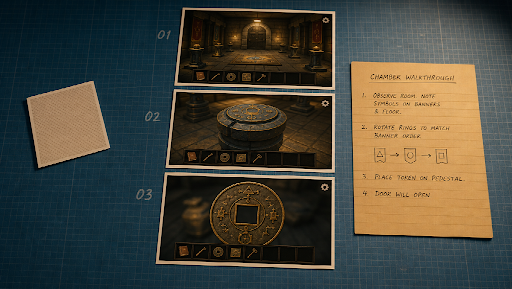
Jay Is Games readers already know the loop: finish an escape room, a puzzle, a tiny indie in the browser, then want something short you can post. Not a two-hour Let's Play. A twenty-second "I cleared this chamber" beat that still looks like the game you played.
A lot of "AI video generator" write-ups on the web are about templates that have nothing to do with that -- romance filters, kissing clips, stock couples. Those are a different product. This walkthrough is for players and small reviewers who already have screenshots and maybe a short capture, and who need a clip that keeps the same room, the same sprite, and the same UI chrome.
This is a review of a job, not a tour of 120 effects.
Part 1: What a clear clip actually has to do
A useful casual-game clip has three beats, the same way a tight review has three paragraphs:
1. Establish -- the room or board you actually saw.
2. Proof -- a motion that could have happened in that room (a door, a token, a character turn).
3. Hold -- still enough for a title or a "full walkthrough on JIG" overlay.
If those three disagree about the wallpaper, viewers bounce. Identity drift is the whole problem: five eight-second generations stitched together will invent a second corridor.
Seedance 2.5 is a multimodal AI video model for coherent clips up to about thirty seconds from text plus image, video, and audio references, with timing and storyboard-friendly direction. On a casual-gaming desk that maps to: pack three stills from one run, write second ranges, generate one continuous pass, then drop it under your own VO or a legal bed.
It is a model, not a timeline suite and not a capture card. Recorded play still wins for the actual puzzle. Generation is for the insert you do not want to re-stage.
Visible export on hosted generators is typically in the 1080p class, often in a 4-30 second window, with a large still kit. Confirm the live panel. Do not write 4K or "one-click cinematic trailer" into a brief the UI does not show.
Part 2: How to make the clip (browser stills, not a couple template)
Step 1 -- Capture a kit, not a mood. Take three screenshots from the same session: wide room, a readable UI or inventory, a closer beat of the object you solved. If two shots are from two different games, you will get a chimera. Faces in selfies do not belong in this folder unless the video is about you and you are fine with that.
Step 2 -- Label the files. 01-wide.png, 02-board.png, 03-hold.png. The model should not have to guess which still is the master.
Step 3 -- Write seconds, the way you write a walkthrough. Example: "0-6s the same puzzle room from still 01, no extra furniture; 6-18s the token from still 03 slides into the slot, UI readable; 18-24s character three-quarter, same outfit as still 02; 24-30s hold for end card -- no new logos, no invented NPCs."
Step 4 -- Attach audio only if you own it. A bed from the game's page if the license allows it. A click you recorded. Do not paste a commercial soundtrack and hope.
Step 5 -- Generate once, then inspect identity. Pause at second twelve. Is the door still the door? Did the HUD grow a second language? If the sprite changed hats, fix the folder. Do not buy a prettier prompt.
Step 6 -- Finish in an editor you already use. Captions, 16:9 for a review embed, 9:16 for a story. Mute-autoplay only if the words are on screen. Gameplay remains the A-roll if you have it.
Part 3: Bonus tips (the stuff templates skip)
Do not prompt protected mascots. "Make it look like a famous plumber" is how you get a legal and visual mess. Original-inspired rooms only, or your screenshots of a game you are reviewing.
Do not fake other players. Generated "friends celebrating" next to a real puzzle is a trust tax on a review site. Real comments stay text.
One variable when a take fails. Tighter crop. A negative ("no extra chairs"). A shorter interval. Not a new aesthetic every retry.
Keep the editor for the parts editors are good at. Transitions, speed ramps, and music ducking still belong on a timeline. The model's job is the middle twenty seconds that would have been a restage.
Preview on a phone. Casual clips die on a tiny screen if the board is unreadable. If you cannot see the token, the still was too wide.
Conclusion
Heartfelt kissing generators and puzzle-room clear clips are not the same purchase. One is a template. The other is a timed beat from assets you already captured while you played.
Seedance 2.5 is the model lane for that 15-30 second, kit-locked insert: screenshots as identity, seconds as the walkthrough, a hold for the title card. Capture the run when you can. Generate the insert when restaging the chamber would take longer than the game. Check the sprite before you hit post.



Update