



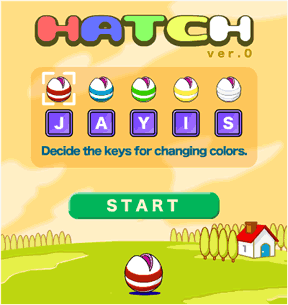
 On over at Eyezmaze has just released another addition to his ever-expanding collection of unique and enchanting Flash games. Hatch is an action arcade game that will put your reflexes and hand-eye coordination to the test.
To play, put your fingers on each of the keys of the keyboard representing the five colors as displayed. The game allows you to assign any keys that are most comfortable and accessible to you. It becomes important later in the game to be able to switch between them quickly and without having to look at your fingers. =)
Click Start to begin and items of the first color will begin to fall. Simply move the mouse to position the egg-ball-hatch thingy underneath the falling item to 'eat' it. Keep moving the mouse until all 40 items have fallen. Not too bad. Now the fun begins. The second level will drop 40 more items of two (2) colors. You must press the corresponding key to change colors before eating an item of that color. Level 3 has you switching between three (3) colors, and so on. At the end of the game, your score is tallied and the egg 'hatches' into something depending on how much was 'eaten'. The game saves what was hatched each game, so you just gotta hatch 'em all! It's a compelling reward system for a fun little Flash game.
While the game may appear unique, it actually borrows its gameplay core mechanic from Dennis Koble's Atari Avalanche coin-op arcade game of 1978. The same gameplay was later to appear repackaged for the Atari 2600 by Activision's Larry Kaplan in the game Kaboom! of 1981.
All things considered, On has managed to create a whole new game playing experience by adding his charming and original graphics and sound effects to a classic gameplay formula, while at the same time increasing the difficulty by adding multiple layers of complexity to it. The result is a game that is sure to delight and entertain people of all ages with On's simplicity of style and characteristic charm. Click.



does anyone have all the cards?
i have like 10 left, but the rest are really hard to get
i v got all 150!!
I have got all 24 creatures. Order:
Rotta
Chiena
Logos
Alex
Plinius
Tontie
Ellyca
PelPet
Vella
Vanilla
Angellina
Pierre
Chelsea
Digda
Raidoe
Cleancle
Ozmek
Rondo
Gatia
Isilmn
Peakat
Tinta
Don.Babun
Aulea
About the Chelsea character, if you click on it a bunch of times, it open s anew game called Happy Chelsea!!
Anyone noticed this?
Here you can see the ">24 creatures of the HATCH game. I've also put plenty of comments, but sorry, it's only in french for the moment...
I'm sorry, but there's no link, can you please post the link to all 24 creatures?
I'm addicted to this game. I have 4 creatures left to hatch. I was wondering if you could repost that link to pictures of all of them, as the link didn't work.
Here are all the creatures except for 4. Also, here is what the happy chelsea game looks like complete:
http://img139.imageshack.us/img139/1297/hatchol9.png
http://img185.imageshack.us/img185/9633/happychelseang1.png
http://www.eyezmaze.com/happy_chelsea/v0/index.html is the link to the chelsea game
I finished the game with 2 tries left!
Can someone please!!!!!!! post a picture or link or something of every creature that can hacth from the egg, I just really want to know.
The happy chelsea is really fun, and depending on how many matches you get, determens what flour blooms. If you beat the game, its
pink fluffly flowers but there are others like fern-like plant, and mushrooms.
Update